
亲测结果: 从相册以及拍照后 均可 显示照片
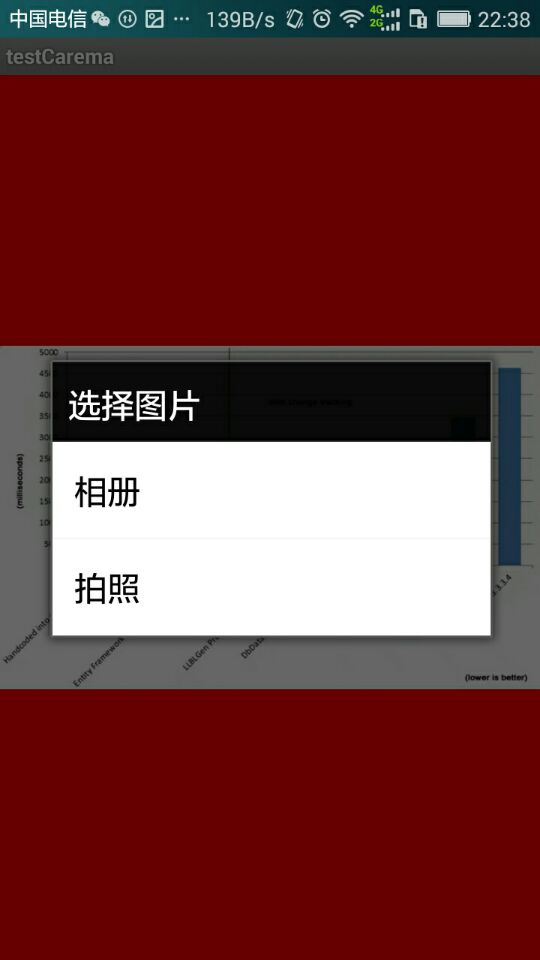
package com.testCarema.android;

import java.io.ByteArrayOutputStream;
import java.io.InputStream;

import android.app.Activity;
import android.app.AlertDialog;
import android.content.ContentResolver;
import android.content.DialogInterface;
import android.content.Intent;
import android.graphics.Bitmap;
import android.graphics.BitmapFactory;
import android.net.Uri;
import android.os.Bundle;
import android.view.View;
import android.view.View.OnClickListener;
import android.widget.ImageView;

public class testCarema extends Activity
{
	/** Called when the activity is first created. */
	private ImageView imageView;
	private OnClickListener imgViewListener;
	private Bitmap myBitmap;
	private byte[] mContent;

	@ Override
	public void onCreate ( Bundle savedInstanceState )
	{
		super.onCreate(savedInstanceState);
		setContentView(R.layout.main);
		imageView = (ImageView) findViewById(R.id.imageView);
		imgViewListener = new OnClickListener()
		{
			public void onClick ( View v )
			{
				final CharSequence[] items =
				{ "相册", "拍照" };
				AlertDialog dlg = new AlertDialog.Builder(testCarema.this).setTitle("选择图片").setItems(items,
						new DialogInterface.OnClickListener()
						{
							public void onClick ( DialogInterface dialog , int item )
							{
								// 这里item是根据选择的方式,
								// 在items数组里面定义了两种方式,拍照的下标为1所以就调用拍照方法
								if (item == 1)
								{
									Intent getImageByCamera = new Intent("android.media.action.IMAGE_CAPTURE");
									startActivityForResult(getImageByCamera, 1);
								} else
								{
									Intent getImage = new Intent(Intent.ACTION_GET_CONTENT);
									getImage.addCategory(Intent.CATEGORY_OPENABLE);
									getImage.setType("image/jpeg");
									startActivityForResult(getImage, 0);
								}
							}
						}).create();
				dlg.show();
			}
		};
		// 给imageView控件绑定点点击监听器
		imageView.setOnClickListener(imgViewListener);

	}

	@ Override
	protected void onActivityResult ( int requestCode , int resultCode , Intent data )
	{
		// TODO Auto-generated method stub
		super.onActivityResult(requestCode, resultCode, data);

		ContentResolver resolver = getContentResolver();
		/**
		 * 因为两种方式都用到了startActivityForResult方法,
		 * 这个方法执行完后都会执行onActivityResult方法, 所以为了区别到底选择了那个方式获取图片要进行判断,
		 * 这里的requestCode跟startActivityForResult里面第二个参数对应
		 */
		if (requestCode == 0)
		{
			try
			{
				// 获得图片的uri
				Uri originalUri = data.getData();
				// 将图片内容解析成字节数组
				mContent = readStream(resolver.openInputStream(Uri.parse(originalUri.toString())));
				// 将字节数组转换为ImageView可调用的Bitmap对象
				myBitmap = getPicFromBytes(mContent, null);
				// //把得到的图片绑定在控件上显示
				imageView.setImageBitmap(myBitmap);
			} catch ( Exception e )
			{
				System.out.println(e.getMessage());
			}

		} else if (requestCode == 1)
		{
			try
			{
				super.onActivityResult(requestCode, resultCode, data);
				Bundle extras = data.getExtras();
				myBitmap = (Bitmap) extras.get("data");
				ByteArrayOutputStream baos = new ByteArrayOutputStream();
				myBitmap.compress(Bitmap.CompressFormat.JPEG, 100, baos);
				mContent = baos.toByteArray();
			} catch ( Exception e )
			{
				// TODO Auto-generated catch block
				e.printStackTrace();
			}
			// 把得到的图片绑定在控件上显示
			imageView.setImageBitmap(myBitmap);
		}
	}

	public static Bitmap getPicFromBytes ( byte[] bytes , BitmapFactory.Options opts )
	{
		if (bytes != null)
			if (opts != null)
				return BitmapFactory.decodeByteArray(bytes, 0, bytes.length, opts);
			else
				return BitmapFactory.decodeByteArray(bytes, 0, bytes.length);
		return null;
	}

	public static byte[] readStream ( InputStream inStream ) throws Exception
	{
		byte[] buffer = new byte[1024];
		int len = -1;
		ByteArrayOutputStream outStream = new ByteArrayOutputStream();
		while ((len = inStream.read(buffer)) != -1)
		{
			outStream.write(buffer, 0, len);
		}
		byte[] data = outStream.toByteArray();
		outStream.close();
		inStream.close();
		return data;

	}

}资源文件列表
testCaremaDowell/.classpath , 475
testCaremaDowell/.project , 846
testCaremaDowell/AndroidManifest.xml , 686
testCaremaDowell/bin/AndroidManifest.xml , 686
testCaremaDowell/bin/classes/com/testCarema/android/BuildConfig.class , 353
testCaremaDowell/bin/classes/com/testCarema/android/R$attr.class , 352
testCaremaDowell/bin/classes/com/testCarema/android/R$drawable.class , 412
testCaremaDowell/bin/classes/com/testCarema/android/R$id.class , 399
testCaremaDowell/bin/classes/com/testCarema/android/R$layout.class , 406
testCaremaDowell/bin/classes/com/testCarema/android/R$string.class , 439
testCaremaDowell/bin/classes/com/testCarema/android/R.class , 559
testCaremaDowell/bin/classes/com/testCarema/android/testCarema$1$1.class , 1557
testCaremaDowell/bin/classes/com/testCarema/android/testCarema$1.class , 1768
testCaremaDowell/bin/classes/com/testCarema/android/testCarema.class , 3958
testCaremaDowell/bin/classes.dex , 6640
testCaremaDowell/bin/res/crunch/drawable-hdpi/icon.png , 3966
testCaremaDowell/bin/res/crunch/drawable-ldpi/icon.png , 1537
testCaremaDowell/bin/res/crunch/drawable-mdpi/icon.png , 2200
testCaremaDowell/bin/resources.ap_ , 10552
testCaremaDowell/bin/testCarema.apk , 15658
testCaremaDowell/gen/com/testCarema/android/BuildConfig.java , 164
testCaremaDowell/gen/com/testCarema/android/R.java , 742
testCaremaDowell/proguard.cfg , 1034
testCaremaDowell/project.properties , 563
testCaremaDowell/res/drawable-hdpi/icon.png , 4147
testCaremaDowell/res/drawable-ldpi/icon.png , 1723
testCaremaDowell/res/drawable-mdpi/icon.png , 2574
testCaremaDowell/res/layout/main.xml , 408
testCaremaDowell/res/values/strings.xml , 171
testCaremaDowell/src/com/testCarema/android/testCarema.java , 4113