
调用外部字库、文字阴影生成图像,“百度”到处都有。
“百度”一般会告诉你一个错误的,但离正确不远的结果。
1、调用外部字库,搜索结果是放入资源文件中,一个字库7、8兆,放上几个,那exe得多大,
在一些博客上找到了方法,是错的,已在评论中纠正。
2、文字阴影可以转为图像,但组件须已显示,比如:
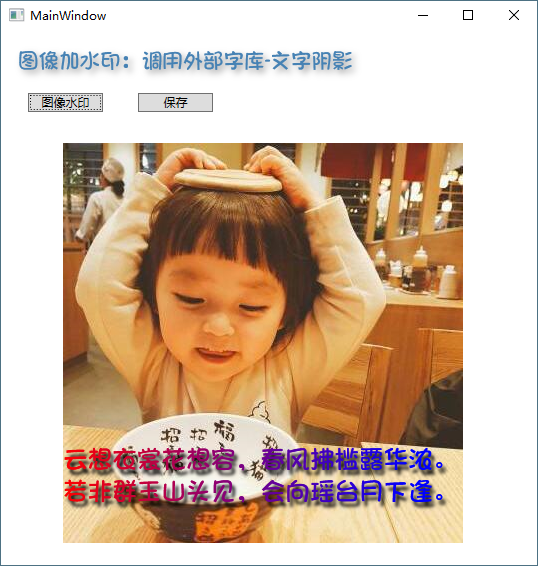
一副图像加上水印文字,DrawText可以直接画,但画模糊阴影文字无法画上去。
本例根据图像大小,画文字自动换行显示,原理是将文字生成背景透明的阴影图像,再画到图像上去,生成1幅图像。
如图像Dpi不为96,调整文字大小或自行修改代码适应。
资源文件列表
DrawText/.vs/DrawText/v15/.suo , 54272
DrawText/.vs/DrawText/v15/Server/sqlite3/db.lock , 0
DrawText/.vs/DrawText/v15/Server/sqlite3/storage.ide , 688128
DrawText/DrawText/App.config , 189
DrawText/DrawText/App.xaml , 370
DrawText/DrawText/App.xaml.cs , 335
DrawText/DrawText/bin/Debug/2.jpg , 28262
DrawText/DrawText/bin/Debug/DrawText.exe , 14336
DrawText/DrawText/bin/Debug/DrawText.exe.config , 189
DrawText/DrawText/bin/Debug/DrawText.pdb , 24064
DrawText/DrawText/bin/Debug/u.jpg , 65400
DrawText/DrawText/bin/Debug/中文字体.ttf , 10828284
DrawText/DrawText/bin/Debug/水印图像.png , 332434
DrawText/DrawText/bin/Debug/水印图像1.png , 242623
DrawText/DrawText/DrawText.csproj , 4138
DrawText/DrawText/MainWindow.xaml , 932
DrawText/DrawText/MainWindow.xaml.cs , 8772
DrawText/DrawText/Properties/AssemblyInfo.cs , 2310
DrawText/DrawText/Properties/Resources.Designer.cs , 2829
DrawText/DrawText/Properties/Resources.resx , 5612
DrawText/DrawText/Properties/Settings.Designer.cs , 1095
DrawText/DrawText/Properties/Settings.settings , 201
DrawText/DrawText.sln , 1123