
实现鼠标移动到某处后放大效果,类似Windows放大镜
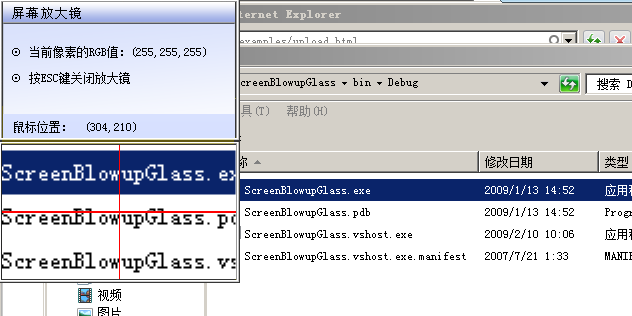
    public partial class Form1 : Form
    {
        public Form1()
        {
            InitializeComponent();
        }

        #region 定义快捷键
        //如果函数执行成功,返回值不为0。
        //如果函数执行失败,返回值为0。要得到扩展错误信息,调用GetLastError。
        [DllImport("user32.dll", SetLastError = true)]
        public static extern bool RegisterHotKey(
        IntPtr hWnd,                //要定义热键的窗口的句柄
        int id,                     //定义热键ID(不能与其它ID重复)
        KeyModifiers fsModifiers,   //标识热键是否在按Alt、Ctrl、Shift、Windows等键时才会生效
        Keys vk                     //定义热键的内容
    );
        [DllImport("user32.dll", SetLastError = true)]
        public static extern bool UnregisterHotKey(
            IntPtr hWnd,                //要取消热键的窗口的句柄
            int id                      //要取消热键的ID
        );
        //定义了辅助键的名称(将数字转变为字符以便于记忆,也可去除此枚举而直接使用数值)
        [Flags()]
        public enum KeyModifiers
        {
            None = 0,
            Alt = 1,
            Ctrl = 2,
            Shift = 4,
            WindowsKey = 8
        }
        #endregion

        #region 获取鼠标像素的RGB
        [DllImport("gdi32.dll")]
        static public extern uint GetPixel(IntPtr hDC, int XPos, int YPos);
        [DllImport("gdi32.dll")]
        static public extern IntPtr CreateDC(string driverName, string deviceName, string output, IntPtr lpinitData);
        [DllImport("gdi32.dll")]
        static public extern bool DeleteDC(IntPtr DC);
        static public byte GetRValue(uint color)
        {
            return (byte)color;
        }
        static public byte GetGValue(uint color)
        {
            return ((byte)(((short)(color)) >> 8));
        }
        static public byte GetBValue(uint color)
        {
            return ((byte)((color) >> 16));
        }
        static public byte GetAValue(uint color)
        {
            return ((byte)((color) >> 24));
        }
        public Color GetColor(Point screenPoint)
        {
            IntPtr displayDC = CreateDC("DISPLAY", null, null, IntPtr.Zero);
            uint colorref = GetPixel(displayDC, screenPoint.X, screenPoint.Y);
            DeleteDC(displayDC);
            byte Red = GetRValue(colorref);
            byte Green = GetGValue(colorref);
            byte Blue = GetBValue(colorref);
            return Color.FromArgb(Red, Green, Blue);
        }
        #endregion


        int screenWidth;        //屏幕宽度
        int screenHeight;       //屏幕高度
        int mx;                 //鼠标x坐标
        int my;                 //鼠标y坐标
        const int imgWidth = 234;//放大后图片的宽度
        const int imgHeight = 134;//放大后图片的高度

        private void Form1_Load(object sender, EventArgs e)
        {
            this.Location = new Point(0,0);
            screenWidth = Screen.PrimaryScreen.WorkingArea.Width;
            screenHeight = Screen.PrimaryScreen.WorkingArea.Height;
            this.TopMost = true;
        }

        private void timer1_Tick(object sender, EventArgs e)
        {
            RegisterHotKey(Handle, 81, KeyModifiers.None, Keys.Escape);
            mx = Control.MousePosition.X;
            my = Control.MousePosition.Y;
            lblmPos.Text="(" mx.ToString() "," my.ToString() ")";
            Point pt = new Point(mx,my);
            Color cl = GetColor(pt);
            lblRGB.Text = "("   cl.R.ToString()   ","   cl.G.ToString()   ","   cl.B   ")";
            if (mx <= this.Width&&my<=this.Height)
            {
                this.Location = new Point(screenWidth-this.Width,0);
            }
            if (mx >= screenWidth - this.Width&&my<=this.Height)
            {
                this.Location = new Point(0,0);
            }
            Bitmap bt = new Bitmap(imgWidth/2,imgHeight/2);
            Graphics g = Graphics.FromImage(bt);
            g.CopyFromScreen(new Point(Cursor.Position.X-imgWidth/4,Cursor.Position.Y-imgHeight/4),new Point(0,0),new Size(imgWidth/2,imgHeight/2));
            IntPtr dc1 = g.GetHdc();
            g.ReleaseHdc(dc1);
            pictureBox1.Image = (Image)bt;

        }

        protected override void WndProc(ref Message m)
        {
            const int WM_HOTKEY = 0x0312;
            //按快捷键
            switch (m.Msg)
            {
                case WM_HOTKEY:
                    switch (m.WParam.ToInt32())
                    {
                        case 81:    //按下的是ESC
                            Application.Exit();
                            break;
                    }
                    break;
            }
            base.WndProc(ref m);
        }

        private void Form1_FormClosed(object sender, FormClosedEventArgs e)
        {
            //注销Id号为81的热键设定
            UnregisterHotKey(Handle, 81);
        }

        private void pictureBox1_Paint(object sender, PaintEventArgs e)
        {
            Graphics g = e.Graphics;
            g.DrawLine(new Pen(Color.Red), new PointF(pictureBox1.Width / 2, 0), new PointF(pictureBox1.Width / 2,pictureBox1.Height));
            g.DrawLine(new Pen(Color.Red,2), new PointF(0, pictureBox1.Height / 2), new PointF(pictureBox1.Width, pictureBox1.Height/2));
        }
}资源文件列表
╞┴─╗╖┼┤≤╛╡/ScreenBlowupGlass.sln , 941
╞┴─╗╖┼┤≤╛╡/ScreenBlowupGlass.suo , 9216
╞┴─╗╖┼┤≤╛╡/ScreenBlowupGlass/bg.bmp , 273832
╞┴─╗╖┼┤≤╛╡/ScreenBlowupGlass/bin/Debug/ScreenBlowupGlass.exe , 372224
╞┴─╗╖┼┤≤╛╡/ScreenBlowupGlass/bin/Debug/ScreenBlowupGlass.pdb , 36352
╞┴─╗╖┼┤≤╛╡/ScreenBlowupGlass/bin/Debug/ScreenBlowupGlass.vshost.exe , 14328
╞┴─╗╖┼┤≤╛╡/ScreenBlowupGlass/bin/Debug/ScreenBlowupGlass.vshost.exe.manifest , 490
╞┴─╗╖┼┤≤╛╡/ScreenBlowupGlass/Form1.cs , 6049
╞┴─╗╖┼┤≤╛╡/ScreenBlowupGlass/Form1.Designer.cs , 6540
╞┴─╗╖┼┤≤╛╡/ScreenBlowupGlass/Form1.resx , 6008
╞┴─╗╖┼┤≤╛╡/ScreenBlowupGlass/obj/Debug/ScreenBlowupGlass.csproj.FileListAbsolute.txt , 2559
╞┴─╗╖┼┤≤╛╡/ScreenBlowupGlass/obj/Debug/ScreenBlowupGlass.csproj.GenerateResource.Cache , 899
╞┴─╗╖┼┤≤╛╡/ScreenBlowupGlass/obj/Debug/ScreenBlowupGlass.exe , 372224
╞┴─╗╖┼┤≤╛╡/ScreenBlowupGlass/obj/Debug/ScreenBlowupGlass.Form1.resources , 180
╞┴─╗╖┼┤≤╛╡/ScreenBlowupGlass/obj/Debug/ScreenBlowupGlass.pdb , 36352
╞┴─╗╖┼┤≤╛╡/ScreenBlowupGlass/obj/Debug/ScreenBlowupGlass.Properties.Resources.resources , 303427
╞┴─╗╖┼┤≤╛╡/ScreenBlowupGlass/obj/Debug/TempPE/Properties.Resources.Designer.cs.dll , 5120
╞┴─╗╖┼┤≤╛╡/ScreenBlowupGlass/Program.cs , 498
╞┴─╗╖┼┤≤╛╡/ScreenBlowupGlass/Properties/AssemblyInfo.cs , 1388
╞┴─╗╖┼┤≤╛╡/ScreenBlowupGlass/Properties/Resources.Designer.cs , 3345
╞┴─╗╖┼┤≤╛╡/ScreenBlowupGlass/Properties/Resources.resx , 6405
╞┴─╗╖┼┤≤╛╡/ScreenBlowupGlass/Properties/Settings.Designer.cs , 1102
╞┴─╗╖┼┤≤╛╡/ScreenBlowupGlass/Properties/Settings.settings , 249
╞┴─╗╖┼┤≤╛╡/ScreenBlowupGlass/ScreenBlowupGlass.csproj , 3971
╞┴─╗╖┼┤≤╛╡/ScreenBlowupGlass/═╝▒Ω.ico , 55406