
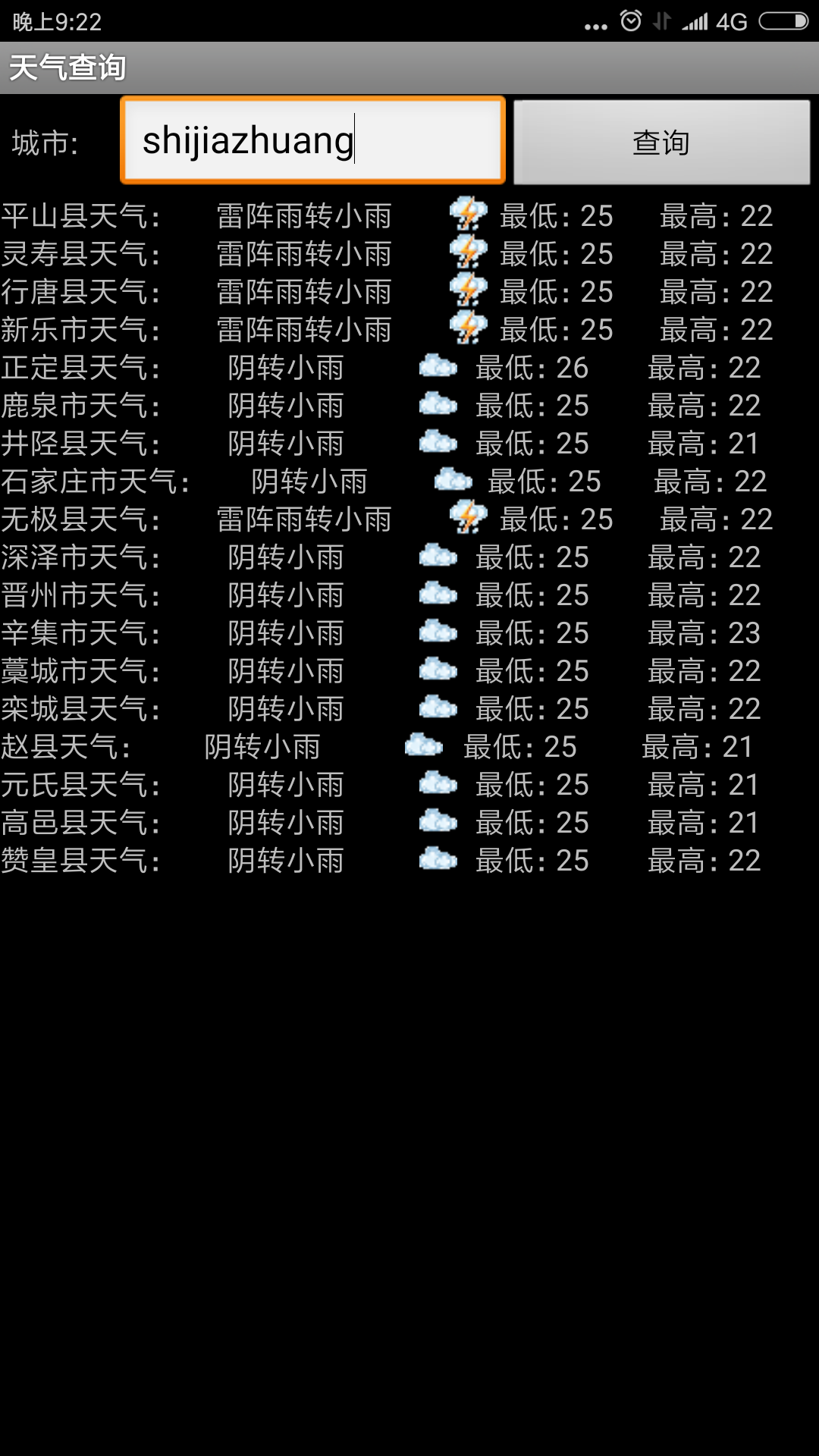
package com.demo.pr7;

import java.io.BufferedReader;
import java.io.ByteArrayInputStream;
import java.io.InputStream;
import java.io.InputStreamReader;
import java.net.HttpURLConnection;
import java.net.URL;
import java.util.Vector;


import org.xmlpull.v1.XmlPullParser;

import android.app.Activity;
import android.graphics.Bitmap;
import android.graphics.BitmapFactory;
import android.os.Bundle;
import android.os.Handler;
import android.os.Message;
import android.util.Xml;
import android.view.View;
import android.view.View.OnClickListener;
import android.widget.Button;
import android.widget.EditText;
import android.widget.ImageView;
import android.widget.LinearLayout;
import android.widget.TextView;
import android.widget.Toast;
import android.widget.LinearLayout.LayoutParams;

public class WebWeatherActivity extends Activity  implements Runnable{
    /** Called when the activity is first created. */
	HttpURLConnection  httpConn = null;
	InputStream din = null;
	Vector<String> cityname=new Vector<String>();
	Vector<String> low=new Vector<String>();
	Vector<String> high=new Vector<String>();
	Vector<String> icon=new Vector<String>();
	Vector<Bitmap> bitmap=new Vector<Bitmap>();
	Vector<String> summary=new Vector<String>();
	int weatherIndex[]=new int[20];
	String city="guangzhou";
	boolean bPress=false;
	boolean bHasData=false;
	LinearLayout  body;
	Button        find;
	EditText      value;
    @Override
    public void onCreate(Bundle savedInstanceState) {
        super.onCreate(savedInstanceState);
        setContentView(R.layout.main);
        setTitle("天气查询");
        body=(LinearLayout)findViewById(R.id.my_body);
        find=(Button)findViewById(R.id.find);
        value=(EditText)findViewById(R.id.value);
        find.setOnClickListener(new OnClickListener() {
			@Override
			public void onClick(View v) {
				// TODO Auto-generated method stub
				body.removeAllViews();//移除当前的所有结果
				city=value.getText().toString();
				Toast.makeText(WebWeatherActivity.this,
					"正在查询天气信息...", Toast.LENGTH_LONG).show();
				Thread th=new Thread(WebWeatherActivity.this);
				th.start();
			}
		});
    }
    @Override
	public void run() {
		// TODO Auto-generated method stub
        cityname.removeAllElements();
        low.removeAllElements();
    	high.removeAllElements();
    	icon.removeAllElements();
    	bitmap.removeAllElements();
    	summary.removeAllElements();
    	//获取数据
		parseData();
		//下载图片
		downImage();
		//通知UI线程显示结果
	    Message message = new Message();
	    message.what = 1;
	    handler.sendMessage(message);
	}
    //获取数据
    public void parseData(){
    	int i=0;
    	String sValue;
    	//city变量表示城市名字的拼音
    	String weatherUrl="http://flash.weather.com.cn/wmaps/xml/" city ".xml";
    	//表示天气情况图标的基础网址
    	String weatherIcon="http://m.weather.com.cn/img/c";
    	try
		{
    	URL  url=new URL(weatherUrl);
    	//建立天气预报查询连接
    	httpConn =(HttpURLConnection)url.openConnection();
    	//采用GET请求方法
    	httpConn.setRequestMethod("GET");
    	//打开数据输入流
    	din=httpConn.getInputStream();
    	InputStreamReader in=new InputStreamReader(httpConn.getInputStream());
    	// 为输出创建BufferedReader
    	BufferedReader  buffer=new BufferedReader(in);

        String    inputLine="";
        String    resultData="";
        //使用循环来读取获得的数据
        while((inputLine=buffer.readLine())!=null)
        {
        	//在每一行后面加上一个"\n"来换行
        	resultData =inputLine "\n";
        }
        //获得XmlPullParser解析器
    	XmlPullParser xmlParser=Xml.newPullParser();
    	ByteArrayInputStream tInputStringStream=null;
    	 //获得解析到的事件类别,这里有开始文档,结束文档,开始标签,结束标签,文本等等事件。
    	tInputStringStream=new ByteArrayInputStream(resultData.getBytes());
    	xmlParser.setInput(tInputStringStream, "UTF-8");

        int evtType=xmlParser.getEventType();
        while(evtType!=XmlPullParser.END_DOCUMENT)//一直循环,直到文档结束
        {
            switch(evtType)
           {
            case XmlPullParser.START_TAG:
                String tag = xmlParser.getName();
               //如果是city标签开始,则说明需要实例化对象了
                if (tag.equalsIgnoreCase("city"))
                {
                	//城市天气预报
           			cityname.addElement(xmlParser.getAttributeValue(null, "cityname") "天气:");
           		    //天气情况概述
           			summary.addElement(xmlParser.getAttributeValue(null, "stateDetailed"));
           			//最低温度
           			low.addElement("最低:" xmlParser.getAttributeValue(null, "tem2"));
           		    //最高温度
           			high.addElement("最高:" xmlParser.getAttributeValue(null, "tem1"));
           		    //天气情况图标网址
           			icon.addElement(weatherIcon xmlParser.getAttributeValue(null, "state1") ".gif");

                }
                break;

           case XmlPullParser.END_TAG:
               //标签结束
               default:break;
           }
           //如果xml没有结束,则导航到下一个节点
           evtType=xmlParser.next();
         }

		}catch (Exception ex){
			ex.printStackTrace();
		}finally{
			//释放连接
			try{
			  din.close();
			  httpConn.disconnect();
			}catch(Exception ex){
			  ex.printStackTrace();
			}
		}

    }
    // 下载图片
    private void downImage()
    {
    	//天气情况图标获取
	    int i=0;
    	for(i=0;i<icon.size();i  ){
    		try
    		{
    			  URL  url=new URL(icon.elementAt(i));
    			  System.out.println(icon.elementAt(i));
    		      httpConn =(HttpURLConnection)url.openConnection();
    		      httpConn.setRequestMethod("GET");
    		      din =httpConn.getInputStream();
    		      //图片数据Bitmap
    		      bitmap.addElement(BitmapFactory.decodeStream(httpConn.getInputStream()));
    		}catch (Exception ex){
    			ex.printStackTrace();
    		}finally{
    			//释放连接
    			try{
    			   din.close();
    			   httpConn.disconnect();
    			}catch(Exception ex){
    			   ex.printStackTrace();
    			}
    		}
    	}
    }
    //显示结果handler
	private final Handler handler = new Handler(){
	  public void handleMessage(Message msg) {
         switch (msg.what) {
             case 1:
            	 showData();
                 break;
             }
             super.handleMessage(msg);
         }
    };
    //显示结果
    public void showData(){
    	body.removeAllViews();//清除存储旧的查询结果的组件
    	body.setOrientation(LinearLayout.VERTICAL);
    	LayoutParams params = new LayoutParams(
	        LayoutParams.WRAP_CONTENT,LayoutParams.WRAP_CONTENT);
    	params.weight=80;
    	params.height=50;
    	for(int i=0;i<cityname.size();i  ){
    		LinearLayout  linerlayout=new LinearLayout(this);
    	    linerlayout.setOrientation(LinearLayout.HORIZONTAL);
    	    //城市
    	    TextView  dayView=new TextView(this);
    	    dayView.setLayoutParams(params);
    	    dayView.setText(cityname.elementAt(i));
    	    linerlayout.addView(dayView);
    	  //描述
    	    TextView  summaryView=new TextView(this);
    	    summaryView.setLayoutParams(params);
    	    summaryView.setText(summary.elementAt(i));
    	    linerlayout.addView(summaryView);
    	    //图标
    	    ImageView  icon=new ImageView(this);
    	    icon.setLayoutParams(params);
    	    icon.setImageBitmap(bitmap.elementAt(i));
    	    linerlayout.addView(icon);
    	    //最低气温
    	    TextView  lowView=new TextView(this);
    	    lowView.setLayoutParams(params);
    	    lowView.setText(low.elementAt(i));
    	    linerlayout.addView(lowView);
    	    //最高气温
    	    TextView  highView=new TextView(this);
    	    highView.setLayoutParams(params);
    	    highView.setText(high.elementAt(i));
    	    linerlayout.addView(highView);
    	    body.addView(linerlayout);


    	}
    }

}资源文件列表
WebWeather/.classpath , 364
WebWeather/.project , 846
WebWeather/AndroidManifest.xml , 770
WebWeather/proguard.cfg , 1248
WebWeather/project.properties , 562
WebWeather/.settings/org.eclipse.jdt.core.prefs , 177
WebWeather/bin/AndroidManifest.xml , 770
WebWeather/bin/classes.dex , 11684
WebWeather/bin/jarlist.cache , 119
WebWeather/bin/resources.ap_ , 10914
WebWeather/bin/WebWeather.apk , 18283
WebWeather/bin/classes/com/demo/pr7/BuildConfig.class , 333
WebWeather/bin/classes/com/demo/pr7/R$attr.class , 322
WebWeather/bin/classes/com/demo/pr7/R$drawable.class , 382
WebWeather/bin/classes/com/demo/pr7/R$id.class , 424
WebWeather/bin/classes/com/demo/pr7/R$layout.class , 376
WebWeather/bin/classes/com/demo/pr7/R$string.class , 409
WebWeather/bin/classes/com/demo/pr7/R.class , 489
WebWeather/bin/classes/com/demo/pr7/WebWeatherActivity$1.class , 806
WebWeather/bin/classes/com/demo/pr7/WebWeatherActivity$2.class , 1495
WebWeather/bin/classes/com/demo/pr7/WebWeatherActivity.class , 7676
WebWeather/bin/dexedLibs/annotations-8271325415a43a564dbe1020a70a2c18.jar , 943
WebWeather/bin/res/drawable-hdpi/icon.png , 3966
WebWeather/bin/res/drawable-ldpi/icon.png , 1537
WebWeather/bin/res/drawable-mdpi/icon.png , 2200
WebWeather/gen/com/demo/pr7/BuildConfig.java , 154
WebWeather/gen/com/demo/pr7/R.java , 831
WebWeather/res/drawable-hdpi/icon.png , 4147
WebWeather/res/drawable-ldpi/icon.png , 1723
WebWeather/res/drawable-mdpi/icon.png , 2574
WebWeather/res/layout/main.xml , 1119
WebWeather/res/values/strings.xml , 179
WebWeather/src/com/demo/pr7/WebWeatherActivity.java , 8100