
自己正在学android,编写了一个简单的数字拼图游戏,有详细注释,适合初学者参考使用,比较简单易懂
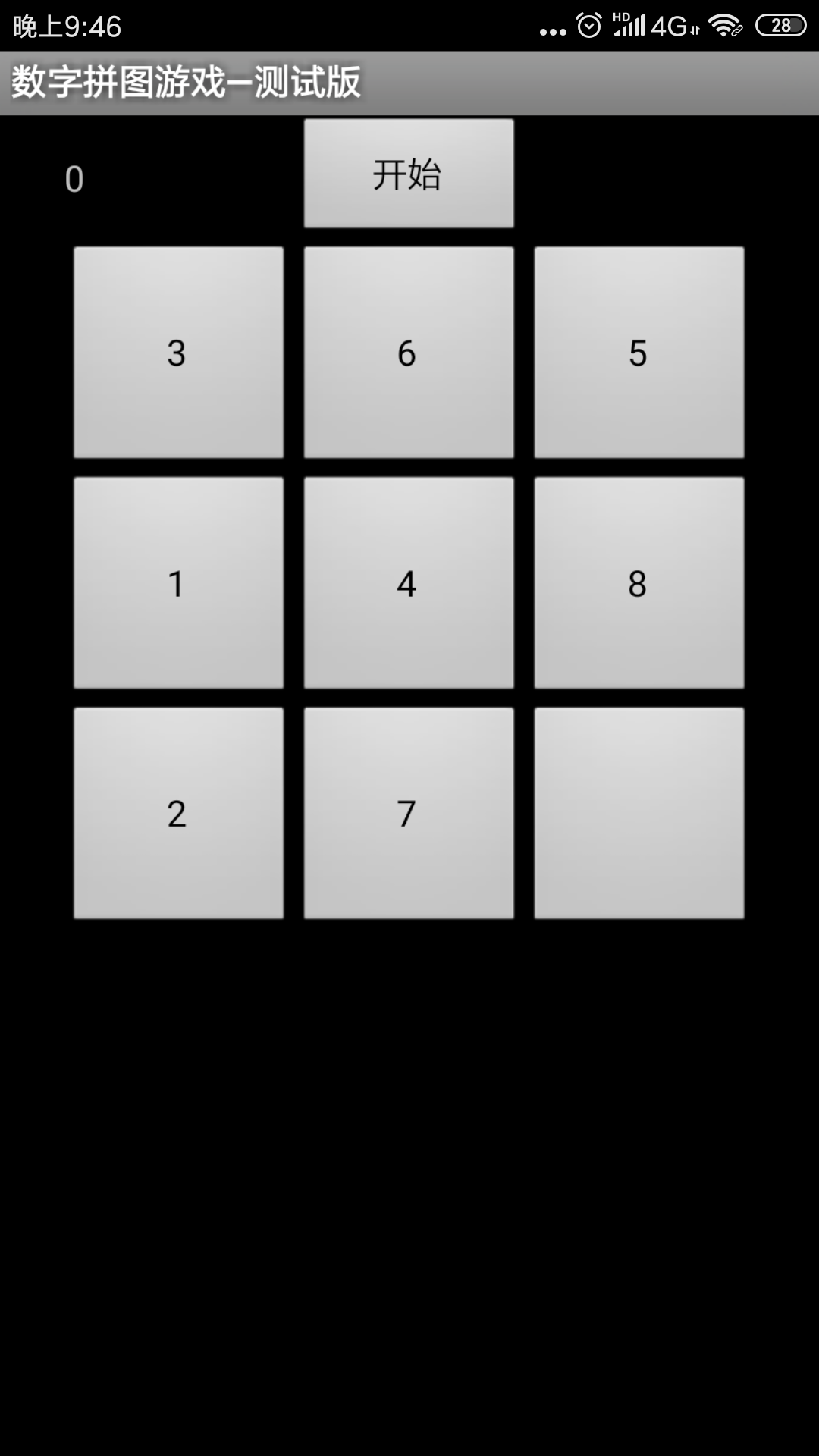
package com.tsu;

import java.util.ArrayList;
import java.util.Collections;

import android.app.Activity;
import android.os.Bundle;
import android.view.View;
import android.view.View.OnClickListener;
import android.widget.Button;
import android.widget.TextView;

public class Test3 extends Activity {
    /** Called when the activity is first created. */

    Button b[]=new Button[9];       //游戏按钮数组
    Button start;                   //开始按钮
    Button n;                       //用来保存显示为空的按钮
    OnClickListener o1=null;        //开始按钮的事件监听器
    OnClickListener o2=null;        //游戏按钮的事件监听器
    TextView show;                  //信息显示组件
    int counter=0;                  //计数器
    @Override
    public void onCreate(Bundle savedInstanceState) {
        super.onCreate(savedInstanceState);
        setContentView(R.layout.main);
        setTitle("数字拼图游戏—测试版");
        start=(Button)findViewById(R.id.start);      //根据id获取各个组件
        b[0]=(Button)findViewById(R.id.b0);
        b[1]=(Button)findViewById(R.id.b1);
        b[2]=(Button)findViewById(R.id.b2);
        b[3]=(Button)findViewById(R.id.b3);
        b[4]=(Button)findViewById(R.id.b4);
        b[5]=(Button)findViewById(R.id.b5);
        b[6]=(Button)findViewById(R.id.b6);
        b[7]=(Button)findViewById(R.id.b7);
        n=b[8]=(Button)findViewById(R.id.b8);
        show=(TextView)findViewById(R.id.show);

        o1=new OnClickListener(){                       //开始按钮事件监听
        	public void onClick(View v)
        	{
        		ArrayList<Integer> al=new ArrayList<Integer>();    //一个集合类用来保存显示的数字
        		for(int i=1;i<9;i  )
        		{
        			al.add(i);                  //把1-8的数字保存在容器中
        		}
        		Collections.shuffle(al);          //利用shuffle方法打乱容器中数字的顺序
        		for(int i=0;i<8;i  )
        		{
        			b[i].setText("" al.get(i));    //把乱序的数字放置在各个游戏按钮上
        		}
        		b[8].setText("");                 //最后一个按钮显示为空字符
        		n=b[8];                      //记住空按钮的位置
        		counter=0;                   //计数器设置为0
        		show.setText("" counter);    //显示计数
        	}
        };
        o2=new OnClickListener(){
        	public void onClick(View v)
        	{
        		Button t=(Button)v;     //获取被点击的按钮
        		if(t==b[0])               //根据不同的按钮来判断相应的按钮
        		{
        			if(n==b[1]||n==b[3])
        			{
        				swap(t);
        			}
        		}
        		else if(t==b[1])
        		{
        			if(n==b[0]||n==b[2]||n==b[4])
        			{
        				swap(t);
        			}
        		}
        		else if(t==b[2])
        		{
        			if(n==b[1]||n==b[5])
        			{
        				swap(t);
        			}
        		}
        		else if(t==b[3])
        		{
        			if(n==b[0]||n==b[6]||n==b[4])
        			{
        				swap(t);
        			}
        		}
        		else if(t==b[4])
        		{
        			if(n==b[1]||n==b[3]||n==b[5]||n==b[7])
        			{
        				swap(t);
        			}
        		}
        		else if(t==b[5])
        		{
        			if(n==b[2]||n==b[8]||n==b[4])
        			{
        				swap(t);
        			}
        		}
        		else if(t==b[6])
        		{
        			if(n==b[3]||n==b[7])
        			{
        				swap(t);
        			}
        		}
        		else if(t==b[7])
        		{
        			if(n==b[6]||n==b[8]||n==b[4])
        			{
        				swap(t);
        			}
        		}
        		else if(t==b[8])
        		{
        			if(n==b[5]||n==b[7])
        			{
        				swap(t);
        			}
        		}
        	}
        };
        start.setOnClickListener(o1);      //给开始按钮添加事件监听
        for(int i=0;i<9;i  )
        {
        	b[i].setOnClickListener(o2);    //给9个游戏按钮
        }
    }
    public void swap(Button t)       //交换方法,用来把点击的按钮和空按钮进行交换显示的文字
    {
		n.setText(t.getText());
		t.setText("");
		n=t;
		show.setText("" (  counter));
    }
}资源文件列表
Test3/.project , 841
Test3/bin/com/tsu/Test3$2.class , 1701
Test3/bin/com/tsu/Test3.class , 2071
Test3/bin/com/tsu/Test3$1.class , 1754
Test3/bin/com/tsu/R$layout.class , 361
Test3/bin/com/tsu/R$id.class , 641
Test3/bin/com/tsu/R$drawable.class , 367
Test3/bin/com/tsu/R$string.class , 394
Test3/bin/com/tsu/R.class , 454
Test3/bin/com/tsu/R$attr.class , 307
Test3/bin/resources.ap_ , 6569
Test3/bin/classes.dex , 5640
Test3/bin/Test3.apk , 10842
Test3/res/drawable/icon.png , 3180
Test3/res/layout/main.xml , 2098
Test3/res/values/strings.xml , 161
Test3/src/com/tsu/Test3.java , 4051
Test3/gen/com/tsu/R.java , 1256
Test3/.classpath , 280
Test3/AndroidManifest.xml , 667
Test3/default.properties , 364