
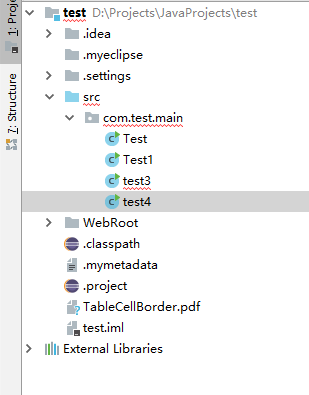
package com.test.main;

import java.io.File;
import java.io.FileOutputStream;
import java.util.ArrayList;
import java.util.List;

import com.itextpdf.text.BaseColor;
import com.itextpdf.text.Document;
import com.itextpdf.text.Element;
import com.itextpdf.text.Font;
import com.itextpdf.text.Image;
import com.itextpdf.text.PageSize;
import com.itextpdf.text.Paragraph;
import com.itextpdf.text.Phrase;
import com.itextpdf.text.Rectangle;
import com.itextpdf.text.pdf.BaseFont;
import com.itextpdf.text.pdf.PdfContentByte;
import com.itextpdf.text.pdf.PdfPCell;
import com.itextpdf.text.pdf.PdfPTable;
import com.itextpdf.text.pdf.PdfReader;
import com.itextpdf.text.pdf.PdfStamper;
import com.itextpdf.text.pdf.PdfWriter;

public class test4 {
	 	    public static  void buidPDF(String pdfFile, String imageFile, String waterMarkName, int permission) {
	 	        try {
	 	            File file = File.createTempFile("tempFile", ".pdf"); // 创建临时文件

	 	            // 生成PDF
	 	            if (createPDFFile(file)) {
	 	                waterMark(file.getPath(), imageFile, pdfFile, waterMarkName,
	 	                        permission); // 添加水印
	 	            }
	 	        } catch (Exception e) {
	 	            e.printStackTrace();
	 	        }
	 	    }

	 	    /**
	 	     * 创建PDF文件
	 	     *
	 	     * @param file
	 	     *            临时文件
	 	     * @return 成功/失败
	 	     */
	 	    public static  boolean createPDFFile(File file) {
	 	        Rectangle rect = new Rectangle(PageSize.A5);
	 	       Document document = new Document();
		        try {
		            PdfWriter.getInstance(document,
		                    new FileOutputStream("TableCellBorder.pdf"));
		            document.open();

		            PdfPTable table = new PdfPTable(3);
		            PdfPCell cell1 = new PdfPCell(new Phrase("Cell 1"));
		            cell1.setUseBorderPadding(true);
		            //
		            // Setting cell's border width and color
		            //
		            cell1.setBorderWidth(5f);
		            cell1.setBorderColor(BaseColor.BLUE);
		            table.addCell(cell1);

		            PdfPCell cell2 = new PdfPCell(new Phrase("Cell 2"));
		            cell2.setUseBorderPadding(true);
		            //
		            // Setting cell's background color
		            //
		            cell2.setBackgroundColor(BaseColor.GRAY);
		            //
		            // Setting cell's individual border color
		            //
		            cell2.setBorderWidthTop(1f);
		            cell2.setBorderColorTop(BaseColor.RED);
		            cell2.setBorderColorRight(BaseColor.GREEN);
		            cell2.setBorderColorBottom(BaseColor.BLUE);
		            cell2.setBorderColorLeft(BaseColor.BLACK);
		            table.addCell(cell2);

		            PdfPCell cell3 = new PdfPCell(new Phrase("Cell 3"));
		            cell3.setUseBorderPadding(true);
		            //
		            // Setting cell's individual border width
		            //
		            cell3.setBorderWidthTop(2f);
		            cell3.setBorderWidthRight(1f);
		            cell3.setBorderWidthBottom(2f);
		            cell3.setBorderWidthLeft(1f);
		            table.addCell(cell3);
		            table.completeRow();

		            document.add(table);
		        } catch (Exception e) {
		            e.printStackTrace();
		        } finally {
		            document.close();
		        }
	 	        return true;
	 	    }

	 	    public static  void waterMark(String inputFile, String imageFile,
	 	            String outputFile, String waterMarkName, int permission) {
	 	        try {
	 	            PdfReader reader = new PdfReader(inputFile);
	 	            PdfStamper stamper = new PdfStamper(reader, new FileOutputStream(
	 	                    outputFile));

	 	            BaseFont base = BaseFont.createFont(
	 	                    "C:/WINDOWS/Fonts/SIMSUN.TTC,1", "Identity-H", true);// 使用系统字体

	 	            int total = reader.getNumberOfPages()   1;
	 	            Image image = Image.getInstance(imageFile);

	 	            // 图片位置
	 	            image.setAbsolutePosition(0,88);
	 	            image.setRotationDegrees(45);
	 	            PdfContentByte under;
	 	            int j = waterMarkName.length();
	 	            char c = 0;
	 	            int rise = 0;
	 	            for (int i = 1; i < total; i  ) {
	 	                rise = 400;
	 	                under = stamper.getUnderContent(i);
	 	                under.beginText();
	 	                under.setFontAndSize(base, 30);

	 	                if (j >= 15) {
	 	                    under.setTextMatrix(200, 120);
	 	                    for (int k = 0; k < j; k  ) {
	 	                        under.setTextRise(rise);
	 	                        c = waterMarkName.charAt(k);
	 	                        under.showText(c   "");
	 	                    }
	 	                } else {
	 	                    under.setTextMatrix(240, 100);
	 	                    for (int k = 0; k < j; k  ) {
	 	                        under.setTextRise(rise);
	 	                        c = waterMarkName.charAt(k);
	 	                        under.showText(c   "");
	 	                        rise -= 18;

	 	                    }
	 	                }

	 	                // 添加水印文字
	 	                under.endText();

	 	                // 添加水印图片
	 	                under.addImage(image);

	 	               /* // 画个圈
	 	                under.ellipse(250, 450, 350, 550);
	 	                under.setLineWidth(1f);
	 	                under.stroke();*/
	 	            }
	 	            stamper.close();
	 	        } catch (Exception e) {
	 	            e.printStackTrace();
	 	        }
	 	}

	 	public static void main(String[] args) {
	 		String imageFilePath = "C:\\Users\\admin\\Desktop\\ruituo.png"; // 水印图片路径
	         String pdfFilePath = "F:\\Download\\itext.PDF"; // 文件生成路径
	         buidPDF(pdfFilePath, imageFilePath, "", 16);
	 	}

	 	public static String leftPad(String str, int i) {
	         int addSpaceNo = i-str.length();
	         String space = "";
	         for (int k=0; k<addSpaceNo; k  ){
	                 space= " " space;
	         };
	         String result =space   str ;
	         return result;
	      }

	     public static void add(List<String> list,int num){
	         for(int i=0;i<num;i  ){
	             list.add("A" i);
	         }
	     }
	     public static void add2(List<String> list,int num){
	         for(int i=0;i<num;i  ){
	             list.add("D" i);
	         }
	     }
	     public static void add1(List<String> list,int num){
	         for(int i=0;i<num;i  ){
	             list.add("C" i);
	         }
	     }
	     public static String printBlank(int tmp){
	           String space="";
	           for(int m=0;m<tmp;m  ){
	               space=space " ";
	           }
	           return space;
	     }

	     /**
	      * 创建一个跨多列的单元格
	      * @param colspan 所占列数
	      * @param paragraph 单元格内容文字
	      * @param align 对齐方式
	      */
	      public static  PdfPCell newPdfPCellByColspan(int colspan,Paragraph paragraph,int align){
	       PdfPTable iTable=new PdfPTable(1);
	       PdfPCell iCell=new PdfPCell();
	       iCell.setColspan(colspan);
	       iCell.setBorder(0);
	       iCell.addElement(paragraph);
	       iCell.setHorizontalAlignment(align);
	       iTable.addCell(iCell);
	       PdfPCell cell=new PdfPCell(iTable);
	       return cell;
	      }

	      /**
	       * 创建一个跨多行的单元格
	       * @param rows 所占行数
	       * @param paragraph 单元格内容文字
	       * @param align 对齐方式
	       */
	       public static  PdfPCell newPdfPCellByRows(int rows,Paragraph paragraph,int align){
	        PdfPTable iTable=new PdfPTable(1);
	        PdfPCell iCell=new PdfPCell();
	        iCell.setFixedHeight(iCell.getFixedHeight()*rows);
	        iTable.addCell(iCell);
	        iCell.addElement(paragraph);
	        iCell.setHorizontalAlignment(align);
	        PdfPCell cell=new PdfPCell(iTable);
	        return cell;
	       }
}
资源文件列表
test/.classpath , 1270
test/.mymetadata , 285
test/.project , 1410
test/.settings/.jsdtscope , 500
test/.settings/org.eclipse.jdt.core.prefs , 330
test/.settings/org.eclipse.wst.jsdt.ui.superType.container , 49
test/.settings/org.eclipse.wst.jsdt.ui.superType.name , 6
test/TableCellBorder.pdf , 1146
test/WebRoot/META-INF/MANIFEST.MF , 36
test/WebRoot/WEB-INF/classes/com/test/main/Test.class , 6388
test/WebRoot/WEB-INF/classes/com/test/main/Test1.class , 11695
test/WebRoot/WEB-INF/classes/com/test/main/test3.class , 1222
test/WebRoot/WEB-INF/classes/com/test/main/test4.class , 7638
test/WebRoot/WEB-INF/lib/iTextAsian.jar , 314878
test/WebRoot/WEB-INF/lib/itext-pdfa-5.5.6-javadoc.jar , 187361
test/WebRoot/WEB-INF/lib/itext-pdfa-5.5.6-sources.jar , 56274
test/WebRoot/WEB-INF/lib/itext-pdfa-5.5.6.jar , 62448
test/WebRoot/WEB-INF/lib/itext-xtra-5.5.6-javadoc.jar , 347077
test/WebRoot/WEB-INF/lib/itext-xtra-5.5.6-sources.jar , 127351
test/WebRoot/WEB-INF/lib/itext-xtra-5.5.6.jar , 116193
test/WebRoot/WEB-INF/lib/itextpdf-5.5.6-javadoc.jar , 5301422
test/WebRoot/WEB-INF/lib/itextpdf-5.5.6-sources.jar , 2329612
test/WebRoot/WEB-INF/lib/itextpdf-5.5.6.jar , 2265668
test/WebRoot/WEB-INF/web.xml , 371
test/WebRoot/index.jsp , 834
test/src/com/test/main/Test.java , 8116
test/src/com/test/main/Test1.java , 16352
test/src/com/test/main/test3.java , 2526
test/src/com/test/main/test4.java , 8464