
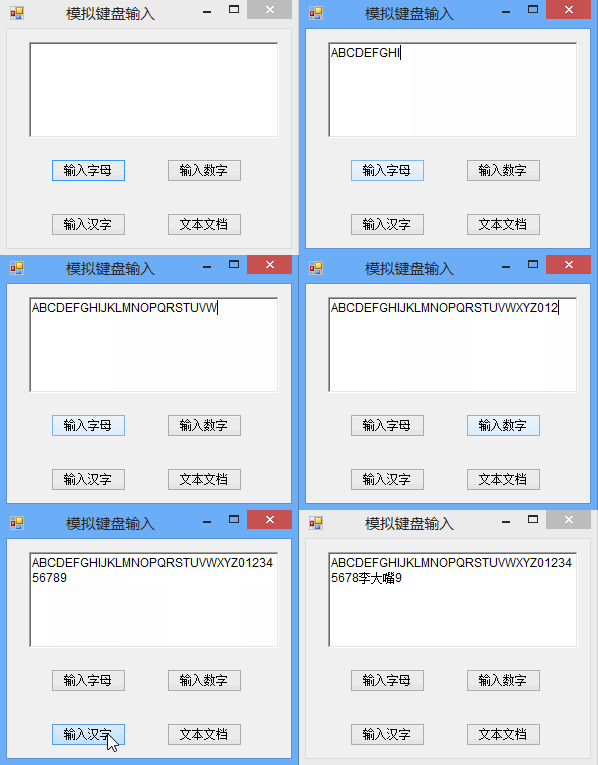
using System;
using System.Collections.Generic;
using System.ComponentModel;
using System.Data;
using System.Drawing;
using System.Text;
using System.Windows.Forms;
using System.Diagnostics;
//Download by http://www.codefans.net
namespace SendKeys_Demo
{
    public partial class Form1 : Form
    {
        public Form1()
        {
            InitializeComponent();
        }

        private void Form1_Load(object sender, EventArgs e)
        {

        }
        //输入字母
        private void button1_Click(object sender, EventArgs e)
        {
            this.richTextBox1.Focus(); //首先获取文本的焦点
            for (int i = 65; i < 91; i  )
            {
                char ch = (char)i; //类型转换
                SendKeys.Send(ch.ToString()); //向活动应用程序发送击键
                System.Threading.Thread.Sleep(50);//当前线程挂起指定的时间
                SendKeys.Flush();//将信息从基础缓冲区移动到其目标,或消除缓冲区,或同时执行两种操作。
            }
        }
        //输入数字
        private void button2_Click(object sender, EventArgs e)
        {
            this.richTextBox1.Focus(); //首先获取文本的焦点
            for (int i = 0; i < 10; i  )
            {
                SendKeys.Send(i.ToString()); //向活动应用程序发送击键
                System.Threading.Thread.Sleep(50);//当前线程挂起指定的时间
                SendKeys.Flush();//将信息从基础缓冲区移动到其目标,或消除缓冲区,或同时执行两种操作。
            }
        }
        //输入汉字
        private void button3_Click(object sender, EventArgs e)
        {
            this.richTextBox1.Focus(); //首先获取文本的焦点
            System.Windows.Forms.SendKeys.Send("{LEFT}"   "李大嘴");

        }

        private void button4_Click(object sender, EventArgs e)
        {
            //启动notepad.exe 记事本程序,并在d:\下创建 或 打开 text_test.txt文件
            System.Diagnostics.Process txt = System.Diagnostics.Process.Start(@"notepad.exe", @"d:\text_test.txt");
            txt.StartInfo.WindowStyle = ProcessWindowStyle.Normal;
            //等待一秒,以便目标程序notepad.exe输入状态就绪
            txt.WaitForInputIdle(1000);
            //如果目标程序 notepad.exe 没有停止响应,则继续
            if (txt.Responding)
            {
                //开始写入内容
                SendKeys.SendWait("-----下面的内容是外部程序自动写入-----\r\n");
                SendKeys.SendWait("刘晶,我爱你!!!");     //将文本框内的内容写入
                SendKeys.SendWait("{Enter}{Enter}");     //写入2个回车
                SendKeys.SendWait("文档创建时间:");
                SendKeys.SendWait("{F5}");          //发送F5按键
                SendKeys.SendWait("{Enter}");       //发送回车键
                SendKeys.SendWait("^s");       //发送 Ctrl   s 键
                SendKeys.SendWait("%{F4}");      // 发送 Alt   F4 键
                MessageBox.Show("文件已成功保存到C:\\text_test!");
            }
        }
    }
}
/*  用法
  1)为了指定单一键盘字符,必须按字符本身的键。例如,为了表示字母 A,可以用 "A" 作为 string。为了表示多个字符,就必须在字符后面直接加上另一个字符。例如,要表示 A、B 及 C,可用 "ABC" 作为 string。
  2)对 SendKeys 来说,加号  、插入符^ 、百分号% 、上划线~ 及圆括号( ) 都具有特殊意义。为了指定上述任何一个字符,要将它放在大括号{}当中。例如,要指定正号,可用 { } 表示。为了指定大括号字符,请使用 {{} 及 {}}。方括号 [ ] 对 SendKeys 来说并不具有特殊意义,但必须将它们放在大括号中。在其它应用程序中,方括号有特殊意义,在出现动态数据交换 (DDE) 的时候,它可能具有重要意义。
  3)为了在按下按键时指定那些不显示的字符,例如 ENTER 或 TAB 以及那些表示动作而非字符的按键,请使用下列代码:
  按键 代码
  BACKSPACE {BACKSPACE}, {BS}或{BKSP}
  BREAK {BREAK}
  CAPS LOCK {CAPSLOCK}
  DEL or DELETE {DELETE} 或 {DEL}
  ENTER {ENTER}或 ~
  ESC {ESC}
  NUM LOCK {NUMLOCK}
  SCROLL LOCK {SCROLLLOCK}
  UP ARROW {UP}
  DOWN ARROW(下箭头) {DOWN}
  LEFT ARROW {LEFT}
  RIGHT ARROW {RIGHT}
  END {END}
  HOME {HOME}
  INS or INSERT {INSERT} 或 {INS}
  PAGE DOWN {PGDN}
  PAGE UP {PGUP}
  PRINT SCREEN {PRTSC}
  WIN ^{ESC}
  TAB {TAB}
  HELP {HELP}
  F1 {F1}
  F2 {F2}
  F3 {F3}
  F4 {F4}
  F5 {F5}
  F6 {F6}
  F7 {F7}
  F8 {F8}
  F9 {F9}
  F10 {F10}
  F11 {F11}
  F12 {F12}
  4)为了指定那些与 SHIFT、CTRL 及 ALT 等按键结合的组合键,可在这些按键码的前面放置一个或多个代码,这些代码列举如下:
  键 代码
  SHIFT
  CTRL ^
  ALT %
  5)为了说明在按下其它按键时应同时按下 SHIFT、CTRL、及 ALT 的任意组合键,请把那些按键的码放在括号当中。例如,为了说明按下 E 与 C 的时候同时按下 SHIFT 键,请使用 " (EC)"。为了说明在按下 E 的时候同时按下 SHIFT 键,但接着按 C 而不按 SHIFT,则使用 " EC"。
  6)为了指定重复键,使用 {key number} 的形式。必须在 key 与 number 之间放置一个空格。例如,{LEFT 42} 意指 42 次按下 LEFT ARROW 键;{h 10} 则是指 10 次按下 H 键。注意 不能用 SendKeys 将按键消息发送到这样一个应用程序——这个应用程序并没有被设计成在 Microsoft Windows 中运行。
注意:Sendkeys 也无法将 PRINT SCREEN 按键发送到任何应用程序。*/资源文件列表
SendKeys实例(模拟键盘输入)/SendKeys_Demo.sln , 929
SendKeys实例(模拟键盘输入)/SendKeys_Demo.suo , 14336
SendKeys实例(模拟键盘输入)/SendKeys_Demo.v12.suo , 14336
SendKeys实例(模拟键盘输入)/SendKeys_Demo/bin/Debug/SendKeys_Demo.exe , 10240
SendKeys实例(模拟键盘输入)/SendKeys_Demo/bin/Debug/SendKeys_Demo.pdb , 28160
SendKeys实例(模拟键盘输入)/SendKeys_Demo/bin/Debug/SendKeys_Demo.vshost.exe , 21656
SendKeys实例(模拟键盘输入)/SendKeys_Demo/bin/Debug/SendKeys_Demo.vshost.exe.manifest , 490
SendKeys实例(模拟键盘输入)/SendKeys_Demo/Form1.cs , 6111
SendKeys实例(模拟键盘输入)/SendKeys_Demo/Form1.Designer.cs , 4545
SendKeys实例(模拟键盘输入)/SendKeys_Demo/Form1.resx , 5814
SendKeys实例(模拟键盘输入)/SendKeys_Demo/obj/Debug/DesignTimeResolveAssemblyReferencesInput.cache , 6307
SendKeys实例(模拟键盘输入)/SendKeys_Demo/obj/Debug/SendKeys_Demo.csproj.FileListAbsolute.txt , 1370
SendKeys实例(模拟键盘输入)/SendKeys_Demo/obj/Debug/SendKeys_Demo.csproj.GenerateResource.Cache , 847
SendKeys实例(模拟键盘输入)/SendKeys_Demo/obj/Debug/SendKeys_Demo.csprojResolveAssemblyReference.cache , 1341
SendKeys实例(模拟键盘输入)/SendKeys_Demo/obj/Debug/SendKeys_Demo.exe , 10240
SendKeys实例(模拟键盘输入)/SendKeys_Demo/obj/Debug/SendKeys_Demo.Form1.resources , 180
SendKeys实例(模拟键盘输入)/SendKeys_Demo/obj/Debug/SendKeys_Demo.pdb , 28160
SendKeys实例(模拟键盘输入)/SendKeys_Demo/obj/Debug/SendKeys_Demo.Properties.Resources.resources , 180
SendKeys实例(模拟键盘输入)/SendKeys_Demo/Program.cs , 474
SendKeys实例(模拟键盘输入)/SendKeys_Demo/Properties/AssemblyInfo.cs , 1358
SendKeys实例(模拟键盘输入)/SendKeys_Demo/Properties/Resources.Designer.cs , 2876
SendKeys实例(模拟键盘输入)/SendKeys_Demo/Properties/Resources.resx , 5612
SendKeys实例(模拟键盘输入)/SendKeys_Demo/Properties/Settings.Designer.cs , 1098
SendKeys实例(模拟键盘输入)/SendKeys_Demo/Properties/Settings.settings , 249
SendKeys实例(模拟键盘输入)/SendKeys_Demo/SendKeys_Demo.csproj , 3353