
在c#创建的开机自启动服务里,调用外部可执行文件有以下问题:
1、带窗口的交互式的exe文件调用后,实际并没有被执行;
2、服务是随windows启动的,服务启动后可能windows桌面还没出来,会报错误,导致程序无法执行;
3、安装服务需管理员权限
等问题。
本例针对上面的一些问题进行解决:
1、调用带窗口的交互式的exe文件,参见Interop.cs文件,
在服务调用问文件WindowsService.cs里面这样引用
Interop.CreateProcess(@”d:\getp.exe”, @”C:\Windows\System32\”); //执行
这里的exe可以是任意的。
2、在服务里建了个线程,延时执行exe文件,避免了第2个问题,同时循环执行,很多软件的服务不断弹出新闻广告就这这样子。
3、管理员权限问题:
在项目上点右键选“属性”,选择“安全性”,勾选复选框“启用ClickOnce”
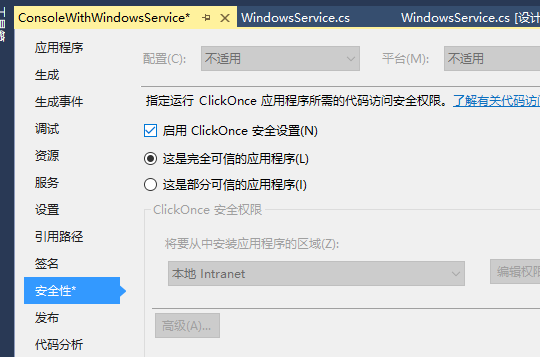
在Properties里面就会出现“app.manifest”文件,对其进行修改
改成
<requestedExecutionLevel level=”requireAdministrator” uiAccess=”false” />

最后返回“安全性”,将复选框“启用ClickOnce”去掉。
这样就可以管理员权限安装了。
编译执行后:
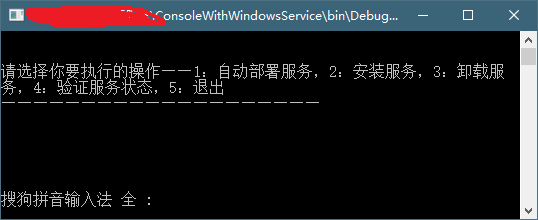
本例安装进程名为“我的数据服务”,每隔200秒执行getp.exe文件。
运行时可选择“1”进行安装,“3”进行卸载,安装完毕后在服务里可以看到“我的数据服务”项目。
资源文件列表
创建服务/.vs/ConsoleWithWindowsService/v14/.suo , 49152
创建服务/ConsoleWithWindowsService/App.config , 189
创建服务/ConsoleWithWindowsService/bin/Debug/ConsoleWithWindowsService.exe , 14848
创建服务/ConsoleWithWindowsService/bin/Debug/ConsoleWithWindowsService.exe.config , 189
创建服务/ConsoleWithWindowsService/bin/Debug/ConsoleWithWindowsService.pdb , 26112
创建服务/ConsoleWithWindowsService/bin/Debug/ConsoleWithWindowsService.vshost.exe , 22696
创建服务/ConsoleWithWindowsService/bin/Debug/ConsoleWithWindowsService.vshost.exe.config , 189
创建服务/ConsoleWithWindowsService/bin/Debug/ConsoleWithWindowsService.vshost.exe.manifest , 3301
创建服务/ConsoleWithWindowsService/ConsoleWithWindowsService.csproj , 3500
创建服务/ConsoleWithWindowsService/Interop.cs , 6863
创建服务/ConsoleWithWindowsService/Program.cs , 4138
创建服务/ConsoleWithWindowsService/Properties/app.manifest , 3301
创建服务/ConsoleWithWindowsService/Properties/AssemblyInfo.cs , 1358
创建服务/ConsoleWithWindowsService/ServiceHelper.cs , 3779
创建服务/ConsoleWithWindowsService/WindowsService.cs , 2000
创建服务/ConsoleWithWindowsService/WindowsService.Designer.cs , 1118
创建服务/ConsoleWithWindowsService.sln , 1042