
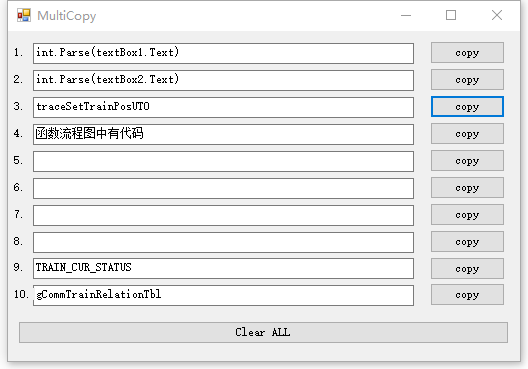
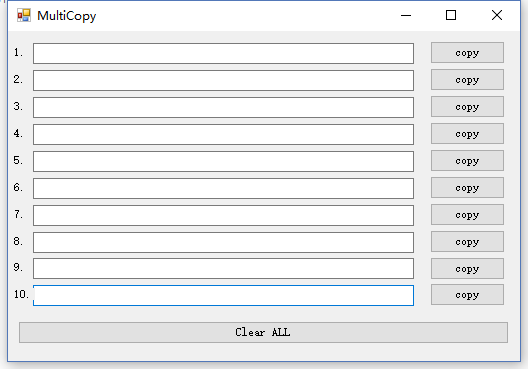
可以快速复制文本框中的值
using System;
using System.Collections.Generic;
using System.ComponentModel;
using System.Data;
using System.Drawing;
using System.IO;
using System.Linq;
using System.Runtime.InteropServices;
using System.Text;
using System.Windows.Forms;

namespace MultiCopy
{
    public partial class Form1 : Form
    {
        private FormDock formDock = null;
        #region 写INI文件
        private string FileName;
        [DllImport("kernel32")]
        private static extern bool WritePrivateProfileString(string section, string key, string val, string filePath);
        [DllImport("kernel32")]
        private static extern int GetPrivateProfileString(string section, string key, string def, byte[] retVal, int size, string filePath);

        public void WriteIni(string Section, string Ident, string Value)
        {
            if (!WritePrivateProfileString(Section, Ident, Value, FileName))
            {
                throw (new ApplicationException("写入配置文件出错"));
            }

        }
        #endregion

        #region 读取INI文件指定
        public string ReadIni(string Section, string Ident, string Default)
        {
            Byte[] Buffer = new Byte[65535];
            int bufLen = GetPrivateProfileString(Section, Ident, Default, Buffer, Buffer.GetUpperBound(0), FileName);
            //必须设定0(系统默认的代码页)的编码方式,否则无法支持中文
            string s = Encoding.GetEncoding(0).GetString(Buffer);
            s = s.Substring(0, bufLen);
            return s.Trim();
        }
        #endregion
        public Form1()
        {
            InitializeComponent();
            formDock = new FormDock(this,300);
        }

        private void button1_Click(object sender, EventArgs e)
        {
            if(textBox1.Text != "")
          Clipboard.SetDataObject(textBox1.Text);
        }

        private void button2_Click(object sender, EventArgs e)
        {
            if (textBox2.Text != "")
                Clipboard.SetDataObject(textBox2.Text);
        }

        private void button3_Click(object sender, EventArgs e)
        {
            if (textBox3.Text != "")
                Clipboard.SetDataObject(textBox3.Text);
        }

        private void button4_Click(object sender, EventArgs e)
        {
            if (textBox4.Text != "")
                Clipboard.SetDataObject(textBox4.Text);
        }

        private void button5_Click(object sender, EventArgs e)
        {
            if (textBox5.Text != "")
                Clipboard.SetDataObject(textBox5.Text);
        }

        private void button6_Click(object sender, EventArgs e)
        {
            if (textBox6.Text != "")
                Clipboard.SetDataObject(textBox6.Text);
        }

        private void button7_Click(object sender, EventArgs e)
        {
            if (textBox7.Text != "")
                Clipboard.SetDataObject(textBox7.Text);
        }

        private void button8_Click(object sender, EventArgs e)
        {
            if (textBox8.Text != "")
                Clipboard.SetDataObject(textBox8.Text);
        }

        private void button9_Click(object sender, EventArgs e)
        {
            textBox1.Text = "";
            textBox2.Text = "";
            textBox3.Text = "";
            textBox4.Text = "";
            textBox5.Text = "";
            textBox6.Text = "";
            textBox7.Text = "";
            textBox8.Text = "";
        }

        private void button10_Click(object sender, EventArgs e)
        {
            if (textBox9.Text != "")
                Clipboard.SetDataObject(textBox9.Text);
        }

        private void button11_Click(object sender, EventArgs e)
        {
            if (textBox10.Text != "")
                Clipboard.SetDataObject(textBox10.Text);
        }

        private void Form1_Load(object sender, EventArgs e)
        {
            Directory.CreateDirectory(Application.StartupPath   "\\Config");//创建文件夹fs
            FileName = Application.StartupPath   "\\Config\\copyCfg.ini";

            textBox1.Text = ReadIni("T1", "t1", "");
            textBox2.Text = ReadIni("T2", "t2", "");
            textBox3.Text = ReadIni("T3", "t3", "");
            textBox4.Text = ReadIni("T4", "t4", "");
            textBox5.Text = ReadIni("T5", "t5", "");
            textBox6.Text = ReadIni("T6", "t6", "");
            textBox7.Text = ReadIni("T7", "t7", "");
            textBox8.Text = ReadIni("T8", "t8", "");
            textBox9.Text = ReadIni("T9", "t9", "");
            textBox10.Text = ReadIni("T10", "t10", "");
        }

        private void textBox1_TextChanged(object sender, EventArgs e)
        {
            WriteIni("T1", "t1", textBox1.Text);
        }

        private void textBox2_TextChanged(object sender, EventArgs e)
        {
            WriteIni("T2", "t2", textBox2.Text);
        }

        private void textBox3_TextChanged(object sender, EventArgs e)
        {
            WriteIni("T3", "t3", textBox3.Text);
        }

        private void textBox4_TextChanged(object sender, EventArgs e)
        {
            WriteIni("T4", "t4", textBox4.Text);
        }

        private void textBox5_TextChanged(object sender, EventArgs e)
        {
            WriteIni("T5", "t5", textBox5.Text);
        }

        private void textBox6_TextChanged(object sender, EventArgs e)
        {
            WriteIni("T6", "t6", textBox6.Text);
        }

        private void textBox7_TextChanged(object sender, EventArgs e)
        {
            WriteIni("T7", "t7", textBox7.Text);
        }

        private void textBox8_TextChanged(object sender, EventArgs e)
        {
            WriteIni("T8", "t8", textBox8.Text);
        }

        private void textBox9_TextChanged(object sender, EventArgs e)
        {
            WriteIni("T9", "t9", textBox9.Text);
        }

        private void textBox10_TextChanged(object sender, EventArgs e)
        {
            WriteIni("T10", "t10", textBox10.Text);
        }

    }

}
资源文件列表
MultiCopy/MultiCopy/Form1.Designer.cs , 21739
MultiCopy/MultiCopy/Form1.cs , 6224
MultiCopy/MultiCopy/Form1.resx , 6184
MultiCopy/MultiCopy/FormDock.cs , 6340
MultiCopy/MultiCopy/MultiCopy.csproj , 3609
MultiCopy/MultiCopy/Program.cs , 490
MultiCopy/MultiCopy/Properties/AssemblyInfo.cs , 1368
MultiCopy/MultiCopy/Properties/Resources.Designer.cs , 2870
MultiCopy/MultiCopy/Properties/Resources.resx , 5612
MultiCopy/MultiCopy/Properties/Settings.Designer.cs , 1096
MultiCopy/MultiCopy/Properties/Settings.settings , 249
MultiCopy/MultiCopy/bin/Debug/Config/copyCfg.ini , 234
MultiCopy/MultiCopy/bin/Debug/MultiCopy.exe , 19968
MultiCopy/MultiCopy/bin/Debug/MultiCopy.pdb , 42496
MultiCopy/MultiCopy/bin/Debug/MultiCopy.vshost.exe , 22712
MultiCopy/MultiCopy/bin/Debug/MultiCopy.vshost.exe.manifest , 490
MultiCopy/MultiCopy/bin/Debug/easyMutiCpyTools.zip , 7861
MultiCopy/MultiCopy/obj/x86/Debug/DesignTimeResolveAssemblyReferences.cache , 1231
MultiCopy/MultiCopy/obj/x86/Debug/DesignTimeResolveAssemblyReferencesInput.cache , 6903
MultiCopy/MultiCopy/obj/x86/Debug/MultiCopy.Form1.resources , 180
MultiCopy/MultiCopy/obj/x86/Debug/MultiCopy.Properties.Resources.resources , 180
MultiCopy/MultiCopy/obj/x86/Debug/MultiCopy.csproj.FileListAbsolute.txt , 1450
MultiCopy/MultiCopy/obj/x86/Debug/MultiCopy.csproj.GenerateResource.Cache , 847
MultiCopy/MultiCopy/obj/x86/Debug/MultiCopy.csprojResolveAssemblyReference.cache , 1759
MultiCopy/MultiCopy/obj/x86/Debug/MultiCopy.exe , 19968
MultiCopy/MultiCopy/obj/x86/Debug/MultiCopy.pdb , 42496
MultiCopy/MultiCopy.sln , 869
MultiCopy/MultiCopy.suo , 19456
MultiCopy/MultiCopy.v12.suo , 40960