
按照轨迹描绘做出几何图像。参照此类方式可制作多种动态数学几何图形。
代码均为后台代码,可加强对path、storyboard等知识的学习理解。
代码可以优化,如有错误自行修正。
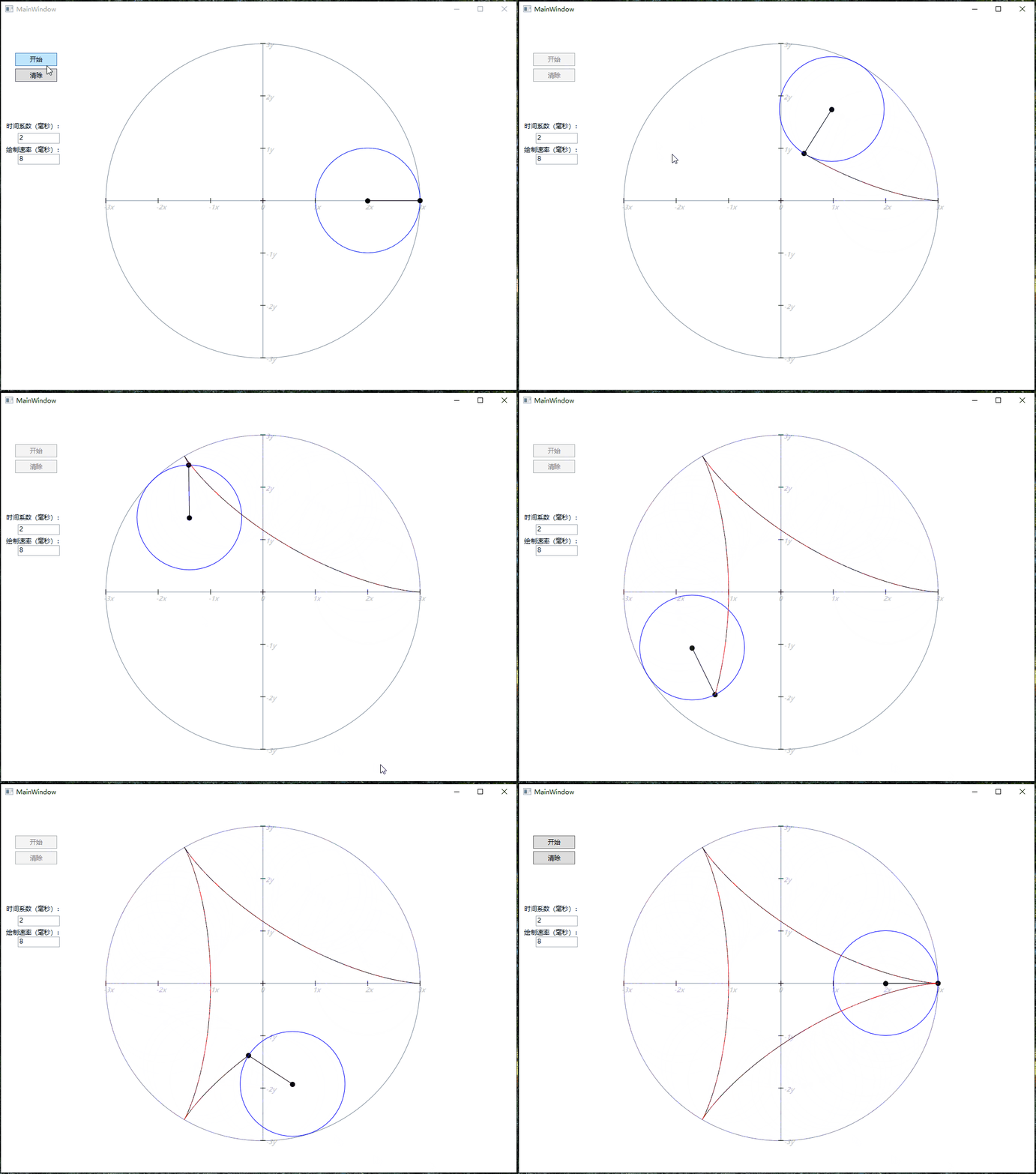
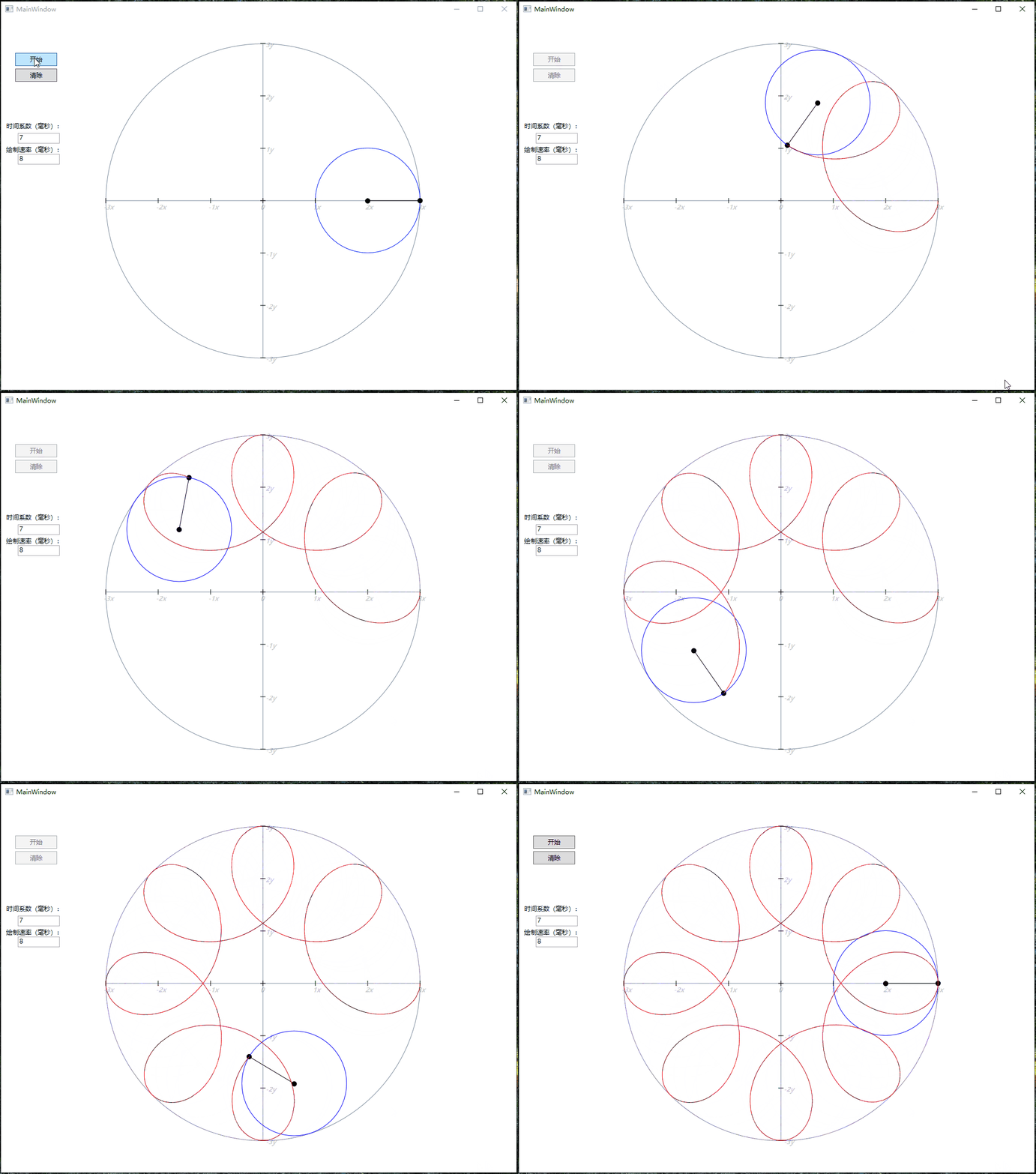
public void Draw_Init(Canvas obj)
        {
            Canvas box_view = new Canvas()
            {
                Width = 800,
                Height = 600,
            };
            Canvas.SetLeft(box_view, 100);
            Canvas.SetTop(box_view,50);
            obj.Children.Add(box_view);

            Draw_Line(box_view, new Point(100, 300), new Point(700, 300), Colors.LightSlateGray, 1);
            Draw_Line(box_view, new Point(400, 0), new Point(400,600), Colors.LightSlateGray, 1);

            for (int i = 0; i < 7; i  )
            {
                Draw_Line(obj, new Point(200   i * 100, 350 - 5), new Point(200   i * 100, 350   5), Colors.Black, 1);
                Draw_Line(obj, new Point(495, 50 i * 100), new Point(505, 50 i * 100), Colors.Black, 1);

                string nx = (i-3) != 0 ? (i-3)   "x" : "0";
                string ny = (3-i) != 0 ? (3-i)   "y" : "";

                TextBlock num_x = new TextBlock()
                {
                    FontSize = 12,
                    FontWeight = FontWeights.Bold,
                    FontStyle = FontStyles.Oblique,
                    Text = nx,
                    Opacity = 0.2
                };
                Canvas.SetLeft(num_x, 195   i * 100);
                Canvas.SetTop(num_x,355);
                obj.Children.Add(num_x);

                TextBlock num_y = new TextBlock()
                {
                    FontSize = 12,
                    FontWeight = FontWeights.Bold,
                    FontStyle = FontStyles.Oblique,
                    Text = ny,
                    Opacity = 0.2
                };
                Canvas.SetLeft(num_y, 505);
                Canvas.SetTop(num_y, 45 i*100);
                obj.Children.Add(num_y);
            }
            obj.Children.Add(polyline);

            Path path_border = new Path()
            {
                Stroke = Brushes.LightSlateGray,
                StrokeThickness = 1,
                Data = Geometry.Parse("M 0,0 A 300,300 45 1 1 0,1 Z")
            };
            Canvas.SetLeft(path_border, 100);
            Canvas.SetTop(path_border, 300);
            box_view.Children.Add(path_border);
            Path path_box = new Path()
            {
                StrokeThickness = 1,
                Data = Geometry.Parse("M 0,0 A 200,200 45 1 0 0,1 Z")
            };

            Canvas.SetLeft(path_box, 600);
            Canvas.SetTop(path_box, 300);
            box_view.Children.Add(path_box);

            Canvas move_block = new Canvas()
            {
                Width = 100,
                Height = 100
            };
            Canvas.SetLeft(move_block, 150);
            Canvas.SetTop(move_block, 250);
            box_view.Children.Add(move_block);

            Path arc_centre = new Path()
            {
                Fill = Brushes.Black,
                Data = Geometry.Parse("M 0, 0 A 5, 5 45 1 1 0, 1 Z")
            };
            Canvas.SetLeft(arc_centre, 445);
            Canvas.SetTop(arc_centre,50);
            move_block.Children.Add(arc_centre);

            Path arc_move = new Path()
            {
                Fill = Brushes.Black
            };
            EllipseGeometry arc_elips = new EllipseGeometry()
            {
                Center = new Point(200,50),
                RadiusX = 5,
                RadiusY = 5,
            };
            arc_move.Data = arc_elips;
            Canvas.SetLeft(arc_move, 350);
            Canvas.SetTop(arc_move, 0);
            obj.RegisterName("Arc_Move", arc_elips);
            move_block.Children.Add(arc_move);

            Path path_center = new Path()
            {
                Stroke = Brushes.Blue,
                StrokeThickness = 1,
                Data = Geometry.Parse("M 200,50 A 100,100 45 1 1 200,49 Z")
            };
            Canvas.SetLeft(path_center, 350);
            Canvas.SetTop(path_center,0);
            move_block.Children.Add(path_center);

            translate = new TranslateTransform()
            {
                X = 0,
                Y = 0
            };
            obj.RegisterName("MyTranslateTransform", translate);
            TransformGroup group = new TransformGroup();
            group.Children.Add(translate);

            move_block.RenderTransform = group;
            story_x = new Storyboard();
            story_y = new Storyboard();
            PathGeometry geometry = new PathGeometry()
            {
                Figures = PathFigureCollection.Parse("M 0,0 A 200,200 45 1 0 0,1 Z")
            };
            Set_AnimationPath(geometry, "MyTranslateTransform", "X", PathAnimationSource.X, story_x);
            Set_AnimationPath(geometry, "MyTranslateTransform", "Y", PathAnimationSource.Y, story_y);

            line = new LineGeometry()
            {
                StartPoint = new Point(100, 50), EndPoint = new Point(200,50)
            };
            Path path_line = new Path()
            {
                Stroke = Brushes.Black,
                StrokeThickness = 1,
                Data = line
            };
            Canvas.SetLeft(path_line, 350);
            Canvas.SetTop(path_line,0);
            obj.RegisterName("Line_Move", line);
            move_block.Children.Add(path_line);

            story_circle = new Storyboard();
            story_arc = new Storyboard();
            PathGeometry pathGeometry = new PathGeometry()
            {
                Figures = PathFigureCollection.Parse("M 200,50 A 100,100 45 1 1 200,49 Z")
            };
            Set_Locus(obj, pathGeometry, "Line_Move", "EndPoint", story_circle);
            Set_Locus(obj, pathGeometry, "Arc_Move", "Center", story_arc);
        }

        private void Set_Locus(Canvas obj, PathGeometry geo, string targetname, string value, Storyboard storyboard)
        {
            PointAnimationUsingPath pointAnimationUsingPath = new PointAnimationUsingPath()
            {
                Duration = new Duration(TimeSpan.FromSeconds(delay / partition)),
                RepeatBehavior = RepeatBehavior.Forever,
            };
            PathGeometry pathGeometry = geo;
            pointAnimationUsingPath.PathGeometry = pathGeometry;

            Storyboard.SetTargetName(pointAnimationUsingPath, targetname);
            Storyboard.SetTargetProperty(pointAnimationUsingPath, new PropertyPath(value));

            storyboard.Children.Add(pointAnimationUsingPath);
            storyboard.Begin(obj, true);
            storyboard.Pause(obj);
        }

        private void Set_AnimationPath(PathGeometry geo, string targetname, string value, PathAnimationSource source, Storyboard storyboard)
        {
            DoubleAnimationUsingPath usingPath = new DoubleAnimationUsingPath()
            {
                Duration = new Duration(TimeSpan.FromSeconds(delay)),
                Source = source,
            };
            usingPath.PathGeometry = geo;

            Storyboard.SetTargetName(usingPath, targetname);
            Storyboard.SetTargetProperty(usingPath, new PropertyPath(value));

            storyboard.Children.Add(usingPath);
            storyboard.Completed  = Story_Completed;
        }
资源文件列表
DT_8/.vs/DT_8/v15/.suo , 51200
DT_8/.vs/DT_8/v15/Server/sqlite3/db.lock , 0
DT_8/.vs/DT_8/v15/Server/sqlite3/storage.ide , 679936
DT_8/.vs/DT_8/v15/Server/sqlite3/storage.ide-shm , 32768
DT_8/.vs/DT_8/v15/Server/sqlite3/storage.ide-wal , 4120032
DT_8/.vs/DT_8/v16/.suo , 52224
DT_8/DT_8/App.config , 189
DT_8/DT_8/App.xaml , 362
DT_8/DT_8/App.xaml.cs , 331
DT_8/DT_8/bin/Debug/DT_8.exe , 16384
DT_8/DT_8/bin/Debug/DT_8.exe.config , 189
DT_8/DT_8/bin/Debug/DT_8.pdb , 42496
DT_8/DT_8/DT_8.csproj , 4171
DT_8/DT_8/MainWindow.xaml , 539
DT_8/DT_8/MainWindow.xaml.cs , 13051
DT_8/DT_8/Properties/AssemblyInfo.cs , 2296
DT_8/DT_8/Properties/Resources.Designer.cs , 2821
DT_8/DT_8/Properties/Resources.resx , 5612
DT_8/DT_8/Properties/Settings.Designer.cs , 1091
DT_8/DT_8/Properties/Settings.settings , 201
DT_8/DT_8.sln , 1117