
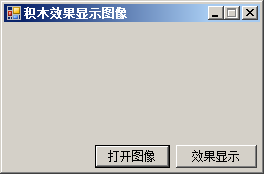
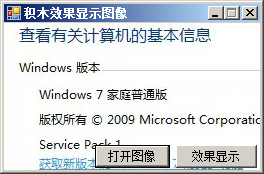
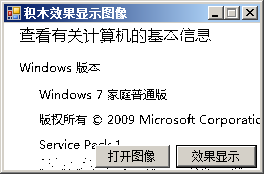
using System;
using System.Collections.Generic;
using System.ComponentModel;
using System.Data;
using System.Drawing;
using System.Text;
using System.Linq;
using System.Windows.Forms;

namespace BuildingBlock
{
    public partial class Frm_Main : Form
    {
        public Frm_Main()
        {
            InitializeComponent();
        }

        private void button1_Click(object sender, EventArgs e)
        {
            openFileDialog1.Filter = "*.jpg,*.jpeg,*.bmp|*.jpg;*.jpeg;*.bmp";
            openFileDialog1.ShowDialog();
            Image myImage = System.Drawing.Image.FromFile(openFileDialog1.FileName);
            this.BackgroundImage = myImage;
        }

        private void button2_Click(object sender, EventArgs e)
        {
            Graphics myGraphics = this.CreateGraphics(); 						//创建窗体的Graphics类
            Bitmap myBitmap = new Bitmap(this.BackgroundImage); 			//实例化Bitmap类
            int myWidth, myHeight, i, j, iAvg, iPixel;							//定义变量
            Color myColor, myNewColor; 								//定义颜色变量
            RectangleF myRect;
            myWidth = myBitmap.Width;									//获取背景图片的宽度
            myHeight = myBitmap.Height;								//获取背景图片的高度
            myRect = new RectangleF(0, 0, myWidth, myHeight);				//获取图片的区域
            Bitmap bitmap = myBitmap.Clone(myRect, System.Drawing.Imaging.PixelFormat.DontCare); 	//实例化Bitmap类
            i = 0;
            //遍历图片的所有象素
            while (i < myWidth - 1)
            {
                j = 0;
                while (j < myHeight - 1)
                {
                    myColor = bitmap.GetPixel(i, j);							//获取当前象素的颜色值
                    iAvg = (myColor.R   myColor.G   myColor.B) / 3;			//平均法
                    iPixel = 0;
                    if (iAvg >= 128)									//如果颜色值大于等于128
                        iPixel = 255;									//设置为255
                    else
                        iPixel = 0;
                    //通过调用Color对象的FromArgb方法获得图像各像素点的颜色
                    myNewColor = Color.FromArgb(255, iPixel, iPixel, iPixel);
                    bitmap.SetPixel(i, j, myNewColor);						//设置颜色值
                    j = j   1;
                }
                i = i   1;
            }
            myGraphics.Clear(Color.WhiteSmoke); 							//以指定的颜色清除
            myGraphics.DrawImage(bitmap, new Rectangle(0, 0, myWidth, myHeight));	//绘制处理后的图片
        }
    }
}资源文件列表
BuildingBlock.sln , 929
BuildingBlock.suo , 25600
BuildingBlock/bin/Debug/BuildingBlock.exe , 9728
BuildingBlock/bin/Debug/BuildingBlock.pdb , 24064
BuildingBlock/BuildingBlock.csproj , 4030
BuildingBlock/Frm_Main.cs , 2676
BuildingBlock/Frm_Main.designer.cs , 3096
BuildingBlock/Frm_Main.resx , 6017
BuildingBlock/obj/Debug/BuildingBlock.csproj.FileListAbsolute.txt , 3887
BuildingBlock/obj/Debug/BuildingBlock.csproj.GenerateResource.Cache , 850
BuildingBlock/obj/Debug/BuildingBlock.csprojResolveAssemblyReference.cache , 1757
BuildingBlock/obj/Debug/BuildingBlock.exe , 9728
BuildingBlock/obj/Debug/BuildingBlock.Frm_Main.resources , 180
BuildingBlock/obj/Debug/BuildingBlock.pdb , 24064
BuildingBlock/obj/Debug/BuildingBlock.Properties.Resources.resources , 180
BuildingBlock/obj/Debug/DesignTimeResolveAssemblyReferencesInput.cache , 7170
BuildingBlock/obj/Debug/TempPE/Properties.Resources.Designer.cs.dll , 4608
BuildingBlock/Program.cs , 497
BuildingBlock/Properties/AssemblyInfo.cs , 1358
BuildingBlock/Properties/Resources.Designer.cs , 2866
BuildingBlock/Properties/Resources.resx , 5612
BuildingBlock/Properties/Settings.Designer.cs , 1113
BuildingBlock/Properties/Settings.settings , 249