
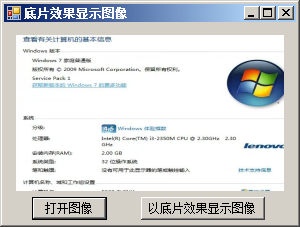
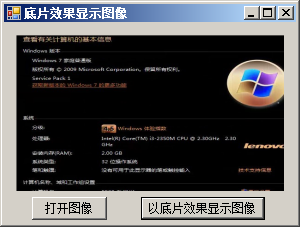
using System;
using System.Collections.Generic;
using System.ComponentModel;
using System.Data;
using System.Drawing;
using System.Text;
using System.Windows.Forms;

namespace NegativeImage
{
    public partial class Frm_Main : Form
    {
        public Frm_Main()
        {
            InitializeComponent();
        }

        private void button2_Click(object sender, EventArgs e)
        {
            //打图像文件
            OpenFileDialog openFileDialog = new OpenFileDialog();
            openFileDialog.Filter = "图像文件(JPeg, Gif, Bmp, etc.)|*.jpg;*.jpeg;*.gif;*.bmp;*.tif; *.tiff; *.png| JPeg 图像文件(*.jpg;*.jpeg)|*.jpg;*.jpeg |GIF 图像文件(*.gif)|*.gif |BMP图像文件(*.bmp)|*.bmp|Tiff图像文件(*.tif;*.tiff)|*.tif;*.tiff|Png图像文件(*.png)| *.png |所有文件(*.*)|*.*";
            if (openFileDialog.ShowDialog() == DialogResult.OK)//判断是否选择了文件
            {
                Bitmap MyBitmap = new Bitmap(openFileDialog.FileName);
                this.pictureBox1.Image = MyBitmap;
            }
        }

        private void button1_Click(object sender, EventArgs e)
        {
            try
            {
                int Height = this.pictureBox1.Image.Height;//获取图片高度
                int Width = this.pictureBox1.Image.Width;//获取图片宽度
                Bitmap newbitmap = new Bitmap(Width, Height);//实例化位图对象
                Bitmap oldbitmap = (Bitmap)this.pictureBox1.Image;//获取原图
                Color pixel;//定义一个Color结构
                //遍历图片的每个位置
                for (int x = 1; x < Width; x  )
                {
                    for (int y = 1; y < Height; y  )
                    {
                        int r, g, b;//定义3个变量,用来记录指定点的R\G\B值
                        pixel = oldbitmap.GetPixel(x, y);//获取指定点的像素值
                        r = 255 - pixel.R;//记录R值
                        g = 255 - pixel.G;//记录G值
                        b = 255 - pixel.B;//记录B值
                        newbitmap.SetPixel(x, y, Color.FromArgb(r, g, b));//为指定点重新着色
                    }
                }
                this.pictureBox1.Image = newbitmap;//显示底片效果的图像
            }
            catch (Exception ex)
            {
                MessageBox.Show(ex.Message, "信息提示", MessageBoxButtons.OK, MessageBoxIcon.Information);
            }
        }
    }
}资源文件列表
NegativeImage.sln , 929
NegativeImage.suo , 25600
NegativeImage/bin/Debug/NegativeImage.exe , 10240
NegativeImage/bin/Debug/NegativeImage.pdb , 24064
NegativeImage/Frm_Main.cs , 2565
NegativeImage/Frm_Main.designer.cs , 3600
NegativeImage/Frm_Main.resx , 5814
NegativeImage/NegativeImage.csproj , 4030
NegativeImage/obj/Debug/DesignTimeResolveAssemblyReferencesInput.cache , 7170
NegativeImage/obj/Debug/NegativeImage.csproj.FileListAbsolute.txt , 3887
NegativeImage/obj/Debug/NegativeImage.csproj.GenerateResource.Cache , 850
NegativeImage/obj/Debug/NegativeImage.csprojResolveAssemblyReference.cache , 1757
NegativeImage/obj/Debug/NegativeImage.exe , 10240
NegativeImage/obj/Debug/NegativeImage.Frm_Main.resources , 180
NegativeImage/obj/Debug/NegativeImage.pdb , 24064
NegativeImage/obj/Debug/NegativeImage.Properties.Resources.resources , 180
NegativeImage/obj/Debug/TempPE/Properties.Resources.Designer.cs.dll , 4608
NegativeImage/Program.cs , 497
NegativeImage/Properties/AssemblyInfo.cs , 1358
NegativeImage/Properties/Resources.Designer.cs , 2866
NegativeImage/Properties/Resources.resx , 5612
NegativeImage/Properties/Settings.Designer.cs , 1113
NegativeImage/Properties/Settings.settings , 249