
一个利用winapi模拟鼠标单击webbrowser中网页实例
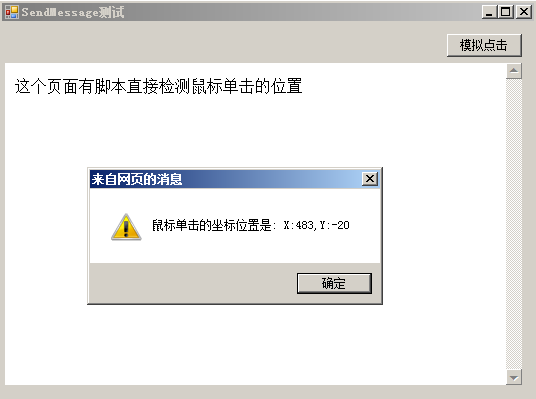
using System;
using System.Collections.Generic;
using System.ComponentModel;
using System.Data;
using System.Drawing;
using System.Linq;
using System.Runtime.InteropServices;
using System.Text;
using System.Windows.Forms;

namespace WebBrowser_SendMessage
{
    public partial class Form1 : Form
    {
        public Form1()
        {
            InitializeComponent();
        }

        private void btnMoNiClick_Click(object sender, EventArgs e)
        {
            MoNiMouseClick();
        }

        private void Form1_Load(object sender, EventArgs e)
        {
            if (webBrowser1.Document == null)
            {
                //imagefield2.x=14&imagefield2.y=13&username=haolizi&password=19850222haolizi
                string htmlTemplate = "<html><body>这个页面有脚本直接检测鼠标单击的位置{0}</body></html>";
                string blogText = "<script>window.document.body.onclick=function(){alert('鼠标单击的坐标位置是: X:' window.event.clientX ',Y:' window.event.clientY);}</script>";
                //blogText = "<script>function mousePosition(ev){ if(ev.pageX || ev.pageY){       return {x:ev.pageX, y:ev.pageY};       }       return {        x:ev.clientX   document.body.scrollLeft - document.body.clientLeft,        y:ev.clientY   document.body.scrollTop - document.body.clientTop        }; }    function mouseMove(ev){     ev = ev || window.event;     var mousePos = mousePosition(ev); alert('X:' mousePos.x ',Y:' mousePos.y);}     document.body.onclick =function(){ mouseMove();} </script>";
                string html = htmlTemplate.Replace("{0}", blogText);
                webBrowser1.Navigate("about:blank");
                while (webBrowser1.ReadyState != WebBrowserReadyState.Complete)
                {
                    Application.DoEvents();
                }
                webBrowser1.Document.Write(html);//这里有问题,明天处理。
                webBrowser1.Refresh();//不刷新一下,Iframe显示不出来。
            }
            //this.webBrowser1.Visible = false;
        }

        [DllImport("user32.dll", CharSet = CharSet.Auto, SetLastError = false)]
        static extern IntPtr SendMessage(IntPtr hWnd, uint Msg, IntPtr wParam, IntPtr lParam);

        [DllImport("user32.dll", SetLastError = true)]
        static extern IntPtr GetWindow(IntPtr hWnd, uint uCmd);

        [DllImport("user32.dll", CharSet = CharSet.Auto)]
        static extern int GetClassName(IntPtr hWnd, StringBuilder lpClassName, int nMaxCount);

        public void MoNiMouseClick()
        {
            int x = 100; // X coordinate of the click
            int y = 280; // Y coordinate of the click
            IntPtr handle = webBrowser1.Handle;
            StringBuilder className = new StringBuilder(100);
            while (className.ToString() != "Internet Explorer_Server") // The class control for the browser
            {
                handle = GetWindow(handle, 5); // Get a handle to the child window
                GetClassName(handle, className, className.Capacity);
            }

            IntPtr lParam = (IntPtr)((y << 16) | x); // The coordinates
            IntPtr wParam = IntPtr.Zero; // Additional parameters for the click (e.g. Ctrl)
            const uint downCode = 0x201; // Left click down code
            const uint upCode = 0x202; // Left click up code
            SendMessage(handle, downCode, wParam, lParam); // Mouse button down
            SendMessage(handle, upCode, wParam, lParam); // Mouse button up
            //SendMessage(handle, upCode, wParam, lParam); // Mouse button up
        }
    }
}
资源文件列表
bin/Debug/WebBrowser_SendMessage.exe , 10240
bin/Debug/WebBrowser_SendMessage.pdb , 22016
bin/Debug/WebBrowser_SendMessage.vshost.exe , 22472
bin/Debug/WebBrowser_SendMessage.vshost.exe.manifest , 490
Form1.cs , 3709
Form1.Designer.cs , 2750
Form1.resx , 5817
obj/Debug/DesignTimeResolveAssemblyReferences.cache , 863
obj/Debug/DesignTimeResolveAssemblyReferencesInput.cache , 6857
obj/Debug/WebBrowser_SendMessage.csproj.FileListAbsolute.txt , 730
obj/Debug/WebBrowser_SendMessage.csproj.GenerateResource.Cache , 975
obj/Debug/WebBrowser_SendMessage.exe , 10240
obj/Debug/WebBrowser_SendMessage.Form1.resources , 180
obj/Debug/WebBrowser_SendMessage.pdb , 22016
obj/Debug/WebBrowser_SendMessage.Properties.Resources.resources , 180
Program.cs , 503
Properties/AssemblyInfo.cs , 1382
Properties/Resources.Designer.cs , 2896
Properties/Resources.resx , 5612
Properties/Settings.Designer.cs , 1109
Properties/Settings.settings , 249
WebBrowser_SendMessage.csproj , 3757
WebBrowser_SendMessage.sln , 933