
代理访问网页源代码
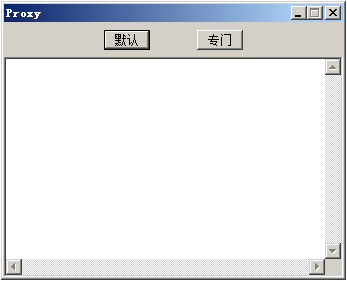
		// 定义私有变量。
		public HttpWebRequest req;
		public HttpWebResponse res;
		public WebProxy proxy;
		public Stream s;
		public StreamReader r;
		// 使用默认代理。
		private void button1_Click(object sender, System.EventArgs e)
		{
			button1.Enabled = false;
			proxy = new WebProxy("http://127.0.0.1:8888", true);
			GlobalProxySelection.Select = proxy;
			req = (HttpWebRequest)WebRequest.Create("http://www.microsoft.com");
			res = (HttpWebResponse)req.GetResponse();
			s = res.GetResponseStream();
			r = new StreamReader(s);
			richTextBox1.Text = r.ReadToEnd();
			r.Close();
			s.Close();
			res.Close();
			button1.Enabled = true;
		}
		// 使用专门代理。
		private void button2_Click(object sender, System.EventArgs e)
		{
			button2.Enabled = false;
			proxy = new WebProxy("http://127.0.0.1:8887", true);
			req = (HttpWebRequest)WebRequest.Create("http://www.microsoft.com");
			req.Proxy = proxy;
			res = (HttpWebResponse)req.GetResponse();
			s = res.GetResponseStream();
			r = new StreamReader(s);
			richTextBox1.Text = r.ReadToEnd();
			r.Close();
			s.Close();
			res.Close();
			button2.Enabled = true;
}资源文件列表
Proxy/App.ico , 1078
Proxy/AssemblyInfo.cs , 1846
Proxy/bin/Debug/Proxy.exe , 8704
Proxy/bin/Debug/Proxy.pdb , 15872
Proxy/Form1.cs , 4653
Proxy/Form1.resx , 5315
Proxy/obj/Debug/Proxy.exe , 8704
Proxy/obj/Debug/Proxy.exe.incr , 1534
Proxy/obj/Debug/Proxy.Form1.resources , 324
Proxy/obj/Debug/Proxy.pdb , 15872
Proxy/obj/Debug/Proxy.projdata , 5512
Proxy/Proxy.csproj , 4363
Proxy/Proxy.csproj.user , 1772
Proxy/Proxy.sln , 906
Proxy/Proxy.suo , 6656