
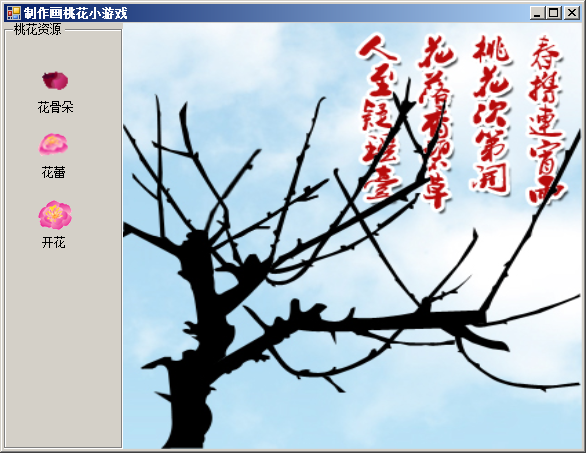
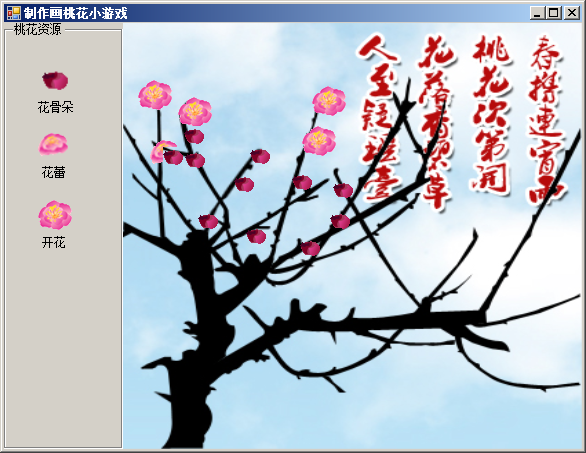
可以画 花骨朵、花蕾、花朵等效果 一枝梅花等你来画哦 小游戏
using System;
using System.Collections.Generic;
using System.ComponentModel;
using System.Data;
using System.Drawing;
using System.Linq;
using System.Text;
using System.Windows.Forms;

namespace DrawPeachBlossom
{
    public partial class Frm_Main : Form
    {
        public Frm_Main()
        {
            InitializeComponent();
        }

        int flag = 0;//定义一个标记,用来标记画桃花的哪个部分
        private void pictureBox2_Click(object sender, EventArgs e)
        {
            flag = 0;//标记绘制花骨朵
        }

        private void pictureBox3_Click(object sender, EventArgs e)
        {
            flag = 1;//标记绘制花蕾
        }

        private void pictureBox4_Click(object sender, EventArgs e)
        {
            flag = 2;//标记绘制开花效果
        }

        private void pictureBox1_MouseClick(object sender, MouseEventArgs e)
        {
            Point myPT = new Point(e.X, e.Y);//获取鼠标单击位置
            PictureBox pbox = new PictureBox();//实例化PictureBox控件
            pbox.Location = myPT;//指定PictureBox控件的位置
            pbox.BackColor = Color.Transparent;//设置PictureBox控件的背景色
            pbox.SizeMode = System.Windows.Forms.PictureBoxSizeMode.StretchImage;//设置PictureBox控件的图片显示方式
            switch (flag)//判断标记
            {
                case 0:
                    pbox.Size = new System.Drawing.Size(20, 18);//设置PictureBox控件大小
                    pbox.Image = Properties.Resources._2;//设置PictureBox控件要显示的图像
                    break;
                case 1:
                    pbox.Size = new System.Drawing.Size(30, 31);//设置PictureBox控件大小
                    pbox.Image = Properties.Resources._3;//设置PictureBox控件要显示的图像
                    break;
                case 2:
                    pbox.Size = new System.Drawing.Size(34, 30);//设置PictureBox控件大小
                    pbox.Image = Properties.Resources._1;//设置PictureBox控件要显示的图像
                    break;
            }
            if (e.Button == MouseButtons.Left)//判断是否单击了鼠标左键
            {
                pictureBox1.Controls.Add(pbox);//将把图片控件添加到桃树上
            }
        }
    }
}
资源文件列表
DrawPeachBlossom.sln , 938
DrawPeachBlossom.suo , 23552
DrawPeachBlossom/bin/Debug/DrawPeachBlossom.exe , 307712
DrawPeachBlossom/bin/Debug/DrawPeachBlossom.pdb , 26112
DrawPeachBlossom/DrawPeachBlossom.csproj , 4320
DrawPeachBlossom/Frm_Main.cs , 2421
DrawPeachBlossom/Frm_Main.Designer.cs , 8184
DrawPeachBlossom/Frm_Main.resx , 229071
DrawPeachBlossom/obj/Debug/DesignTimeResolveAssemblyReferences.cache , 789
DrawPeachBlossom/obj/Debug/DesignTimeResolveAssemblyReferencesInput.cache , 7936
DrawPeachBlossom/obj/Debug/DrawPeachBlossom.csproj.FileListAbsolute.txt , 4657
DrawPeachBlossom/obj/Debug/DrawPeachBlossom.csproj.GenerateResource.Cache , 990
DrawPeachBlossom/obj/Debug/DrawPeachBlossom.csprojResolveAssemblyReference.cache , 1757
DrawPeachBlossom/obj/Debug/DrawPeachBlossom.exe , 307712
DrawPeachBlossom/obj/Debug/DrawPeachBlossom.Frm_Main.resources , 149121
DrawPeachBlossom/obj/Debug/DrawPeachBlossom.pdb , 26112
DrawPeachBlossom/obj/Debug/DrawPeachBlossom.Properties.Resources.resources , 147561
DrawPeachBlossom/obj/Debug/TempPE/Properties.Resources.Designer.cs.dll , 5120
DrawPeachBlossom/Program.cs , 500
DrawPeachBlossom/Properties/AssemblyInfo.cs , 1388
DrawPeachBlossom/Properties/Resources.Designer.cs , 4320
DrawPeachBlossom/Properties/Resources.resx , 6889
DrawPeachBlossom/Properties/Settings.Designer.cs , 1116
DrawPeachBlossom/Properties/Settings.settings , 249
DrawPeachBlossom/Resources/1.gif , 1717
DrawPeachBlossom/Resources/2.gif , 1051
DrawPeachBlossom/Resources/3.gif , 1463
DrawPeachBlossom/Resources/4.jpg , 142266