
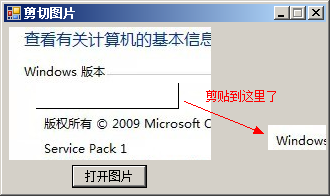
鼠标滑动截图,截图后 点击winform其它位置 则将图片黏贴到相应位置
using System;
using System.Collections.Generic;
using System.ComponentModel;
using System.Data;
using System.Drawing;
using System.Text;
using System.Linq;
using System.Windows.Forms;
using System.Drawing.Imaging;

namespace CutImage
{
    public partial class Frm_Main : Form
    {
        bool isDrag = false;													//是否可以剪切图片
        Rectangle theRectangle = new Rectangle(new Point(0, 0), new Size(0, 0));				//实例化Rectangle类
        Point startPoint, oldPoint;												//定义Point类
        private Graphics ig;													//定义Graphics类
        public Frm_Main()
        {
            InitializeComponent();
        }

        private void button1_Click(object sender, EventArgs e)
        {
            //设置文件的类型
            openFileDialog1.Filter = "*.jpg,*.jpeg,*.bmp,*.gif,*.ico,*.png,*.tif,*.wmf|*.jpg;*.jpeg;*.bmp;*.gif;*.ico;*.png;*.tif;*.wmf";
            openFileDialog1.ShowDialog();										//打开文件对话框
            Image myImage = System.Drawing.Image.FromFile(openFileDialog1.FileName);		//实例化Image类
            pictureBox1.Image = myImage;										//显示图片
        }

        private void pictureBox1_MouseDown(object sender, MouseEventArgs e)
        {
            if (e.Button == MouseButtons.Left)
            {
                //如果开始绘制,则开始记录鼠标位置
                if ((isDrag = !isDrag) == true)
                {
                    startPoint = new Point(e.X, e.Y);								//记录鼠标的当前位置
                    oldPoint = new Point(e.X, e.Y);
                }
            }
        }

        private void pictureBox1_MouseUp(object sender, MouseEventArgs e)
        {
            isDrag = false;
            ig = pictureBox1.CreateGraphics();								//创建pictureBox1控件的Graphics类
            //绘制矩形框
            ig.DrawRectangle(new Pen(Color.Black, 1), startPoint.X, startPoint.Y, e.X - startPoint.X, e.Y - startPoint.Y);
            theRectangle = new Rectangle(startPoint.X, startPoint.Y, e.X - startPoint.X, e.Y - startPoint.Y);	//获得矩形框的区域
        }

        private void pictureBox1_MouseMove(object sender, MouseEventArgs e)
        {
            Graphics g = this.CreateGraphics();										//为当前窗体创建Graphics类
            if (isDrag)														//如果鼠示已按下
            {
                //绘制一个矩形框
                g.DrawRectangle(new Pen(Color.Black, 1), startPoint.X, startPoint.Y, e.X - startPoint.X, e.Y - startPoint.Y);
            }
        }

        private void Form1_MouseClick(object sender, MouseEventArgs e)
        {
            try
            {
                Graphics graphics = this.CreateGraphics();						//为当前窗体创建Graphics类
                Bitmap bitmap = new Bitmap(pictureBox1.Image);					//实例化Bitmap类
                Bitmap cloneBitmap = bitmap.Clone(theRectangle, PixelFormat.DontCare);//通过剪切图片的大小实例化Bitmap类
                graphics.DrawImage(cloneBitmap, e.X, e.Y);						//绘制剪切的图片
                Graphics g = pictureBox1.CreateGraphics();
                SolidBrush myBrush = new SolidBrush(Color.White);				//定义画刷
                g.FillRectangle(myBrush, theRectangle);							//绘制剪切后的图片
            }
            catch { }
        }
    }
}资源文件列表
CutImage.sln , 914
CutImage.suo , 20992
CutImage/bin/Debug/CutImage.exe , 10752
CutImage/bin/Debug/CutImage.pdb , 24064
CutImage/CutImage.csproj , 4020
CutImage/Frm_Main.cs , 3474
CutImage/Frm_Main.designer.cs , 3591
CutImage/Frm_Main.resx , 6017
CutImage/obj/Debug/CutImage.csproj.FileListAbsolute.txt , 3537
CutImage/obj/Debug/CutImage.csproj.GenerateResource.Cache , 850
CutImage/obj/Debug/CutImage.csprojResolveAssemblyReference.cache , 1757
CutImage/obj/Debug/CutImage.exe , 10752
CutImage/obj/Debug/CutImage.Frm_Main.resources , 180
CutImage/obj/Debug/CutImage.pdb , 24064
CutImage/obj/Debug/CutImage.Properties.Resources.resources , 180
CutImage/obj/Debug/DesignTimeResolveAssemblyReferencesInput.cache , 7140
CutImage/obj/Debug/TempPE/Properties.Resources.Designer.cs.dll , 4608
CutImage/Program.cs , 492
CutImage/Properties/AssemblyInfo.cs , 1348
CutImage/Properties/Resources.Designer.cs , 2856
CutImage/Properties/Resources.resx , 5612
CutImage/Properties/Settings.Designer.cs , 1108
CutImage/Properties/Settings.settings , 249