
批量给照片添加拍照日期
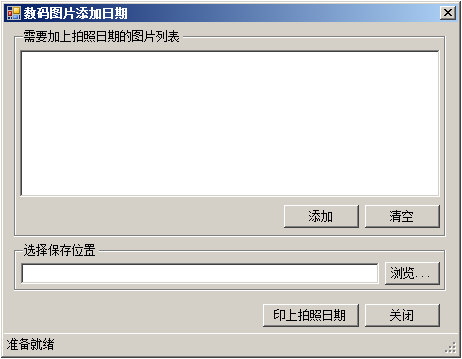
        private void AddDate()
        {
            Font normalContentFont = new Font("宋体", 36,FontStyle.Bold);
            Color normalContentColor = Color.Red;
            int kk = 1;
            toolStripProgressBar1.Maximum = listBox1.Items.Count;
            toolStripProgressBar1.Minimum = 1;
            toolStripStatusLabel1.Text = "开始添加数码相片拍摄日期";
            for (int i = 0; i < listBox1.Items.Count; i  )
            {
                pi = GetExif(listBox1.Items[i].ToString());
                //获取元数据中的拍照日期时间,以字符串形式保存
                TakePicDateTime = GetDateTime(pi);
                //分析字符串分别保存拍照日期和时间的标准格式
                SpaceLocation = TakePicDateTime.IndexOf(" ");
                pdt = TakePicDateTime.Substring(0, SpaceLocation);
                pdt = pdt.Replace(":", "-");
                ptm = TakePicDateTime.Substring(SpaceLocation   1, TakePicDateTime.Length - SpaceLocation - 2);
                TakePicDateTime = pdt   " "   ptm;
                //由列表中的文件创建内存位图对象
                Pic = new Bitmap(listBox1.Items[i].ToString());
                //由位图对象创建Graphics对象的实例
                g = Graphics.FromImage(Pic);
                //绘制数码照片的日期/时间
                g.DrawString(TakePicDateTime, normalContentFont, new SolidBrush(normalContentColor),
            Pic.Width - 700, Pic.Height - 200);
                //将添加日期/时间戳后的图像进行保存
                if (txtSavePath.Text.Length == 3)
                {
                    Pic.Save(txtSavePath.Text   Path.GetFileName(listBox1.Items[i].ToString()));
                }
                else
                {
                    Pic.Save(txtSavePath.Text  "\\"  Path.GetFileName(listBox1.Items[i].ToString()));
                }
                //释放内存位图对象
                Pic.Dispose();
                toolStripProgressBar1.Value = kk;
                if (kk == listBox1.Items.Count)
                {
                    toolStripStatusLabel1.Text = "全部数码相片拍摄日期添加成功";
                    toolStripProgressBar1.Visible = false;
                    flag = null;
                    listBox1.Items.Clear();
                }
                kk  ;
            }
}资源文件列表
╕°═╝╞¼╝╙╚╒╞┌/IMGAddDate.sln , 920
╕°═╝╞¼╝╙╚╒╞┌/IMGAddDate/bin/Debug/IMGAddDate.exe , 14336
╕°═╝╞¼╝╙╚╒╞┌/IMGAddDate/bin/Debug/IMGAddDate.pdb , 34304
╕°═╝╞¼╝╙╚╒╞┌/IMGAddDate/bin/Debug/IMGAddDate.vshost.exe , 14328
╕°═╝╞¼╝╙╚╒╞┌/IMGAddDate/bin/Debug/IMGAddDate.vshost.exe.manifest , 490
╕°═╝╞¼╝╙╚╒╞┌/IMGAddDate/Form1.cs , 6099
╕°═╝╞¼╝╙╚╒╞┌/IMGAddDate/Form1.Designer.cs , 10007
╕°═╝╞¼╝╙╚╒╞┌/IMGAddDate/Form1.resx , 6427
╕°═╝╞¼╝╙╚╒╞┌/IMGAddDate/IMGAddDate.csproj , 3881
╕°═╝╞¼╝╙╚╒╞┌/IMGAddDate/obj/Debug/IMGAddDate.csproj.FileListAbsolute.txt , 3043
╕°═╝╞¼╝╙╚╒╞┌/IMGAddDate/obj/Debug/IMGAddDate.csproj.GenerateResource.Cache , 847
╕°═╝╞¼╝╙╚╒╞┌/IMGAddDate/obj/Debug/IMGAddDate.exe , 14336
╕°═╝╞¼╝╙╚╒╞┌/IMGAddDate/obj/Debug/IMGAddDate.Form1.resources , 180
╕°═╝╞¼╝╙╚╒╞┌/IMGAddDate/obj/Debug/IMGAddDate.pdb , 34304
╕°═╝╞¼╝╙╚╒╞┌/IMGAddDate/obj/Debug/IMGAddDate.Properties.Resources.resources , 180
╕°═╝╞¼╝╙╚╒╞┌/IMGAddDate/obj/Debug/TempPE/Properties.Resources.Designer.cs.dll , 4608
╕°═╝╞¼╝╙╚╒╞┌/IMGAddDate/Program.cs , 491
╕°═╝╞¼╝╙╚╒╞┌/IMGAddDate/Properties/AssemblyInfo.cs , 1392
╕°═╝╞¼╝╙╚╒╞┌/IMGAddDate/Properties/Resources.Designer.cs , 2844
╕°═╝╞¼╝╙╚╒╞┌/IMGAddDate/Properties/Resources.resx , 5817
╕°═╝╞¼╝╙╚╒╞┌/IMGAddDate/Properties/Settings.Designer.cs , 1095
╕°═╝╞¼╝╙╚╒╞┌/IMGAddDate/Properties/Settings.settings , 249