
C#实现word转换成html文档
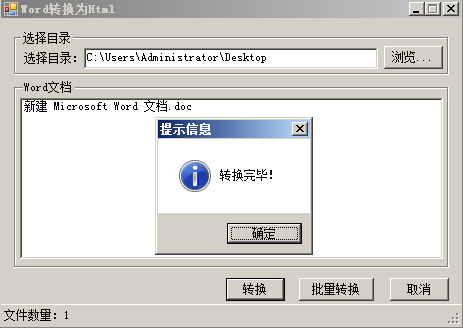
using System;
using System.Collections.Generic;
using System.ComponentModel;
using System.Data;
using System.Drawing;
using System.Linq;
using System.Text;
using System.Windows.Forms;
using System.IO;

namespace WordToHtml
{
    public partial class Form1 : Form
    {
        public Form1()
        {
            InitializeComponent();
        }

        public static void BatchConvert(string docDir)//如果批量转换
        {
            //创建数组保存文件夹下的文件名
            string[] docFiles = Directory.GetFiles(docDir, "*.doc");
            for (int i = 0; i < docFiles.Length; i  )
            {
                WordToHtmlFile(docFiles[i]);
            }
            MessageBox.Show("转换完毕!", "提示信息", MessageBoxButtons.OK, MessageBoxIcon.Information);
        }
        //将word转换为html
        public static void WordToHtmlFile(string WordFilePath)
        {
            try
            {
                Word.Application wApp = new Word.Application();
                //指定原文件和目标文件
                object docPath = WordFilePath;
                string htmlPath = WordFilePath.Substring(0, WordFilePath.Length - 3)   "html";
                object Target = htmlPath;
                //缺省参数
                object Unknown = Type.Missing;
                //只读方式打开
                object readOnly = true;
                //打开doc文件
                Word.Document document = wApp.Documents.Open(ref docPath, ref Unknown,
                ref readOnly, ref Unknown, ref Unknown,
                ref Unknown, ref Unknown, ref Unknown,
                ref Unknown, ref Unknown, ref Unknown,
                ref Unknown);
                // 指定格式
                object format = Word.WdSaveFormat.wdFormatHTML;
                // 转换格式
                document.SaveAs(ref Target, ref format,
                ref Unknown, ref Unknown, ref Unknown,
                ref Unknown, ref Unknown, ref Unknown,
                ref Unknown, ref Unknown, ref Unknown);
                // 关闭文档和Word程序
                document.Close(ref Unknown, ref Unknown, ref Unknown);
                wApp.Quit(ref Unknown, ref Unknown, ref Unknown);
            }
            catch (Exception e)
            {
                MessageBox.Show(e.Message);
            }
        }
        private void button1_Click(object sender, EventArgs e)
        {
            if (folderBrowserDialog1.ShowDialog() == DialogResult.OK)
            {
                tsslInfo.Text = "";
                txtWordPath.Text = folderBrowserDialog1.SelectedPath;
                string[] docFiles = Directory.GetFiles(txtWordPath.Text.Trim(),"*.doc");
                for (int i = 0; i < docFiles.Length; i  )
                {
                    string docPath=docFiles[i].ToString();
                    string docName = docPath.Substring(docPath.LastIndexOf("\\")   1, docPath.Length - docPath.LastIndexOf("\\") -1);
                    listView1.Items.Add(docName);
                }
                tsslInfo.Text = "文件数量:" listView1.Items.Count.ToString();
            }
        }

        private void button2_Click(object sender, EventArgs e)//单个转换
        {
            if (listView1.Items.Count > 0)
            {
                if (listView1.SelectedItems.Count > 0)
                {
                    if (MessageBox.Show("确定将此文档转换为HTML文件吗?", "提示信息", MessageBoxButtons.OKCancel, MessageBoxIcon.Information) == DialogResult.OK)
                    {
                        string docPath = txtWordPath.Text.Trim()   "\\"   listView1.SelectedItems[0].Text;
                        WordToHtmlFile(docPath);
                        MessageBox.Show("转换完毕!", "提示信息", MessageBoxButtons.OK, MessageBoxIcon.Information);
                    }
                }
                else
                {
                    MessageBox.Show("请选择要转换的Word文档!");
                }
            }
        }

        private void button4_Click(object sender, EventArgs e)//批量转换
        {
            if (listView1.Items.Count > 0)
            {
                if (MessageBox.Show("确定将批量将文档转换为HTML文件吗?", "提示信息", MessageBoxButtons.OKCancel, MessageBoxIcon.Information) == DialogResult.OK)
                {
                    BatchConvert(txtWordPath.Text.Trim());
                }
            }
        }

        private void button3_Click(object sender, EventArgs e)
        {
            Application.Exit();
        }
    }
}
资源文件列表
WordToHtml/WordToHtml.sln , 920
WordToHtml/WordToHtml.suo , 14336
WordToHtml/WordToHtml/bin/Debug/Interop.Office.dll , 155648
WordToHtml/WordToHtml/bin/Debug/Interop.VBIDE.dll , 57344
WordToHtml/WordToHtml/bin/Debug/Interop.Word.dll , 495616
WordToHtml/WordToHtml/bin/Debug/WordToHtml.exe , 12800
WordToHtml/WordToHtml/bin/Debug/WordToHtml.pdb , 28160
WordToHtml/WordToHtml/bin/Debug/WordToHtml.vshost.exe , 14328
WordToHtml/WordToHtml/bin/Debug/WordToHtml.vshost.exe.manifest , 490
WordToHtml/WordToHtml/Form1.cs , 4765
WordToHtml/WordToHtml/Form1.Designer.cs , 8661
WordToHtml/WordToHtml/Form1.resx , 6223
WordToHtml/WordToHtml/obj/Debug/Interop.Office.dll , 155648
WordToHtml/WordToHtml/obj/Debug/Interop.VBIDE.dll , 57344
WordToHtml/WordToHtml/obj/Debug/Interop.Word.dll , 495616
WordToHtml/WordToHtml/obj/Debug/WordToHtml.csproj.FileListAbsolute.txt , 2676
WordToHtml/WordToHtml/obj/Debug/WordToHtml.csproj.GenerateResource.Cache , 847
WordToHtml/WordToHtml/obj/Debug/WordToHtml.csproj.ResolveComReference.cache , 796
WordToHtml/WordToHtml/obj/Debug/WordToHtml.exe , 12800
WordToHtml/WordToHtml/obj/Debug/WordToHtml.Form1.resources , 180
WordToHtml/WordToHtml/obj/Debug/WordToHtml.pdb , 28160
WordToHtml/WordToHtml/obj/Debug/WordToHtml.Properties.Resources.resources , 180
WordToHtml/WordToHtml/Program.cs , 491
WordToHtml/WordToHtml/Properties/AssemblyInfo.cs , 1385
WordToHtml/WordToHtml/Properties/Resources.Designer.cs , 2870
WordToHtml/WordToHtml/Properties/Resources.resx , 5612
WordToHtml/WordToHtml/Properties/Settings.Designer.cs , 1095
WordToHtml/WordToHtml/Properties/Settings.settings , 249
WordToHtml/WordToHtml/WordToHtml.csproj , 6266
WordToHtml/WordToHtml/WordToHtml.csproj.user , 485