
只要电脑配置了JDK, 便可使用Json2Bean, 不用导入到eclipse或android studio, 直接双击就可以打开使用, 每次使用之前要重新设置编辑规则,不用改动什么规则,点”确认生效”就可以 要不然不能正确的生成Bean,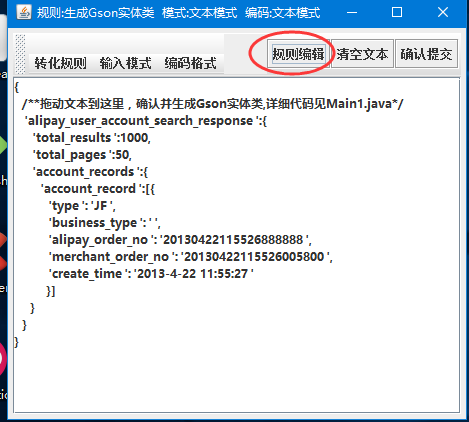
示例代码:
package debug1;

import java.io.FileInputStream;
import java.io.FileNotFoundException;
import java.io.IOException;


import utils.myjava.entitytools.GsonEntityTools;
import utils.myjava.string.StringFactory;

import com.google.gson.Gson;

public class Main1 {


	static String json;
	static{
	 try {  //读取json文件
		json= StringFactory.readResourceAsStream("/debug1/text1.txt");
	} catch (IOException e) {
		// TODO Auto-generated catch block
		e.printStackTrace();
	}
	}

	public static void main(String[] args) throws Exception {
		//实体测试
	            String  entityCode=
	             new GsonEntityTools(json)   //自动生成GSON实体类
				.setFilepath(null)
				.setJavaName("JSON1")
				.setPackageName("test")
				.setToString(true)
				.setSerializable(true)
				.commit();
	    //赋值
	            JSON1 obj= new Gson().fromJson( StringFactory.readResourceAsStream("/debug1/text1.txt"),JSON1.class);
	            System.err.println(obj);


	}


}
资源文件列表
Json2JavaBean/GsonEntityTools.xml , 205
Json2JavaBean/MyTools.jar , 1062200
Json2JavaBean/start.bat , 21
Json2JavaBean/╘┤┬δ.zip , 1172172