
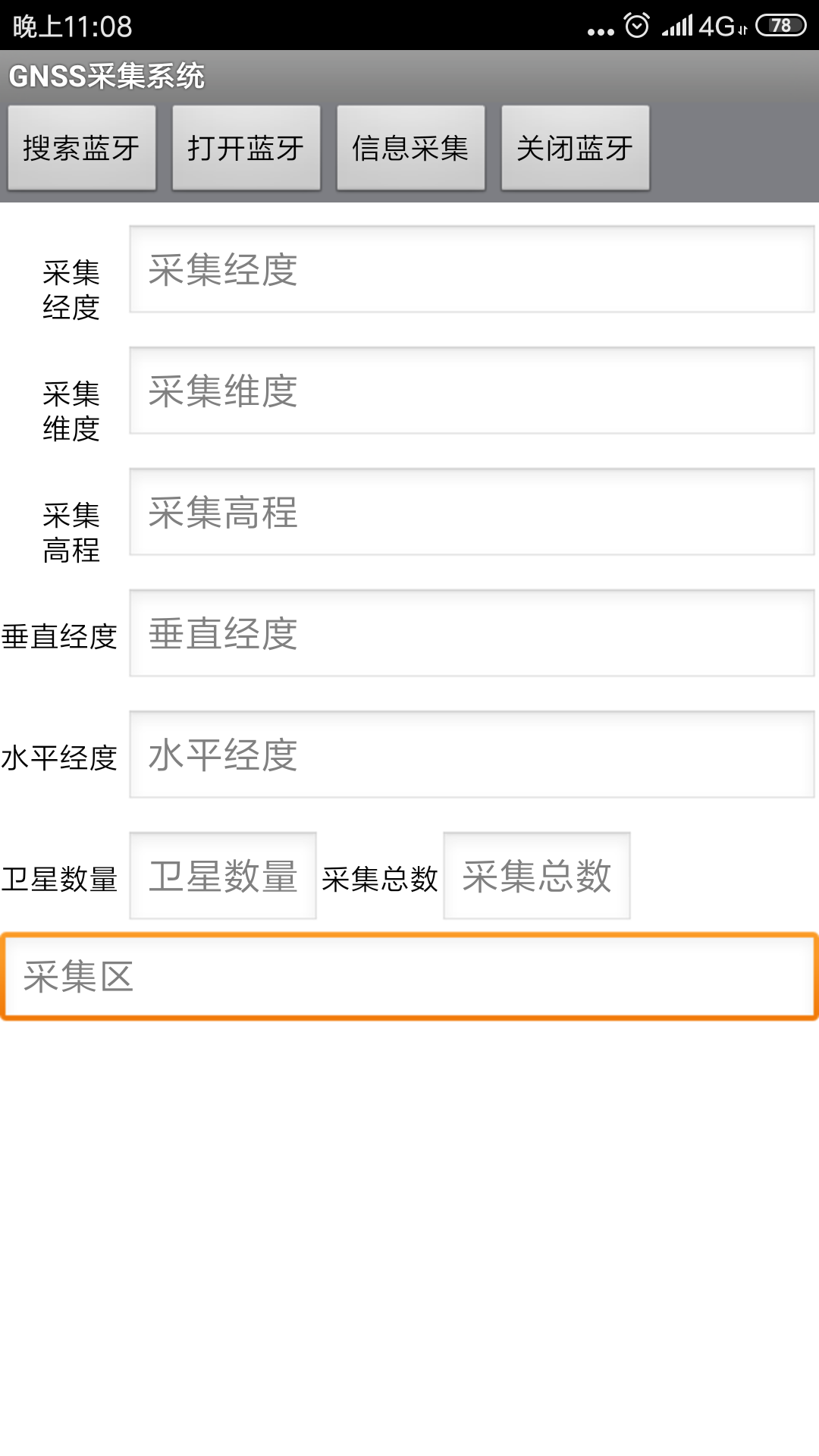
android手机上先通过蓝牙链接上RTK,打开程序,打开蓝牙,接收数据,显示数据。主要应用与解析RTK中的数据。
package com.lan;

import java.io.IOException;
import java.io.InputStream;
import java.io.OutputStream;
import java.io.UnsupportedEncodingException;
import android.app.Activity;
import android.os.Bundle;
import android.os.Handler;
import android.os.Message;
import android.util.Log;
import android.view.View;
import android.widget.Button;
import android.widget.EditText;
import android.widget.RadioButton;
import android.widget.RadioGroup;
import android.widget.TextView;
import android.widget.Toast;
import android.widget.ToggleButton;
import android.widget.RadioGroup.OnCheckedChangeListener;

public class RelayControl extends Activity  implements OnCheckedChangeListener{

	public static boolean isRecording = false;// 线程控制标记

	private ToggleButton tgbt1,tgbt2,tgbt3,tgbt4;

	private Button releaseCtrl,btBack,btSend;

	private OutputStream outStream = null;

	private EditText _txtRead,_txtSend ;

	private ConnectedThread manageThread;
	private Handler mHandler;

	private RadioGroup radioType;
	private RadioButton rbPC;
	private String  encodeType ="GBK";

	@Override
	public void onCreate(Bundle savedInstanceState){
		super.onCreate(savedInstanceState);
		setContentView(R.layout.relaycontrol);

		//接收线程启动
		manageThread=new ConnectedThread();
		mHandler  = new MyHandler();
		manageThread.Start();

		findMyView();

		setMyViewListener();


		setTitle("返回前需先关闭socket连接");
		//接收区不可见
		_txtRead.setCursorVisible(false);      //设置输入框中的光标不可见
		_txtRead.setFocusable(false);           //无焦点

	}

	private void findMyView() {

		tgbt1=(ToggleButton) findViewById(R.id.toggleButton1);
		tgbt2=(ToggleButton) findViewById(R.id.toggleButton2);
		tgbt3=(ToggleButton) findViewById(R.id.toggleButton3);
		tgbt4=(ToggleButton) findViewById(R.id.toggleButton4);

		releaseCtrl=(Button)findViewById(R.id.button1);
		btBack=(Button) findViewById(R.id.button2);
		btSend=(Button) findViewById(R.id.btSend);

        radioType = (RadioGroup) findViewById(R.id.radio_type);
        rbPC =(RadioButton) findViewById(R.id.rb_pc);

		_txtRead = (EditText) findViewById(R.id.etShow);
		_txtSend = (EditText) findViewById(R.id.etSend);

	}

	private void setMyViewListener() {
		// 监听RadioButton
		radioType.setOnCheckedChangeListener(this);
		rbPC.setChecked(true);//设置为默认选中为 PC通信

		tgbt1.setOnClickListener(new ClickEvent());
		tgbt2.setOnClickListener(new ClickEvent());
		tgbt3.setOnClickListener(new ClickEvent());
		tgbt4.setOnClickListener(new ClickEvent());

		releaseCtrl.setOnClickListener(new ClickEvent());
		btBack.setOnClickListener(new ClickEvent());
		btSend.setOnClickListener(new ClickEvent());
	}


	public void onDestroy()
    {

		try {
			lylist.btSocket.close();
		} catch (IOException e) {
			e.printStackTrace();
		}
        super.onDestroy();
    }


	public void onCheckedChanged(RadioGroup group, int checkedId){

		switch(checkedId){
		case R.id.rb_pc:
			encodeType="GBK";
			break;
		case R.id.rb_phone:
			encodeType="UTF-8";
			break;
		default:
			break;
		}
	}

	private	class ClickEvent implements View.OnClickListener {

		public void onClick(View v) {

			if (v == releaseCtrl)// 释放连接
			{
				try {
					lylist.btSocket.close();
					manageThread.Stop();
					//testBlueTooth.serverThread.cancel();
					//Toast.makeText(getApplicationContext(), "socket连接已关闭", Toast.LENGTH_SHORT);
					setTitle("socket连接已关闭");
				} catch (IOException e) {
					//Log .e(TAG,"ON RESUME: Unable to close socket during connection failure", e2);
					//Toast.makeText(getApplicationContext(), "关闭连接失败", Toast.LENGTH_SHORT);
					setTitle("关闭连接失败");
				}

			}
			else if (v == btBack) {// 返回

				RelayControl.this.finish();

			}
			else if (v == tgbt1)// 继电器按钮1
			{

				if (tgbt1.isChecked() == false)
					sendMessage("11");
				else if (tgbt1.isChecked() == true)
					sendMessage("10");

			} else if (v == tgbt2) {

				if (tgbt2.isChecked() == false)
					sendMessage("21");
				else if (tgbt2.isChecked() == true)
					sendMessage("20");

			} else if (v == tgbt3) {

				if (tgbt3.isChecked() == false)
					sendMessage("31");
				else if (tgbt3.isChecked() == true)
					sendMessage("30");

			} else if (v == tgbt4) {

				if (tgbt4.isChecked() == false)
					sendMessage("41");
				else if (tgbt4.isChecked() == true)
					sendMessage("40");

			}else if (v == btSend){

					String infoSend =_txtSend.getText().toString();
					sendMessage(infoSend);
					setTitle("发送成功");

			}

		}

	}


	  public static void setEditTextEnable(TextView view,Boolean able){
	       // view.setTextColor(R.color.read_only_color);   //设置只读时的文字颜色
	        if (view instanceof android.widget.EditText){
	            view.setCursorVisible(able);      //设置输入框中的光标不可见
	            view.setFocusable(able);           //无焦点
	            view.setFocusableInTouchMode(able);     //触摸时也得不到焦点
	        }
	  }

	public void sendMessage(String message) {

		//控制模块
		try {
			outStream = lylist.btSocket.getOutputStream();

		} catch (IOException e) {
			// TODO Auto-generated catch block
			//Log.e(TAG, "ON RESUME: Output stream creation failed.", e);
			Toast.makeText(getApplicationContext(), " Output stream creation failed.", Toast.LENGTH_SHORT);

		}


		byte[] msgBuffer = null;
		try {
			msgBuffer = message.getBytes(encodeType);//编码
		} catch (UnsupportedEncodingException e1) {
			// TODO Auto-generated catch block
			e1.printStackTrace();
			Log.e("write", "Exception during write encoding GBK ", e1);
		}


		//while(true){
			try {
				outStream.write(msgBuffer);
				//Toast.makeText(getApplicationContext(), "发送数据中..", Toast.LENGTH_SHORT);
				setTitle("成功发送指令:" message);
			} catch (IOException e) {
				// TODO Auto-generated catch block
				//Log.e(TAG, "ON RESUME: Exception during write.", e);
				Toast.makeText(getApplicationContext(), "发送数据失败", Toast.LENGTH_SHORT);

			}

		}


	 class ConnectedThread extends Thread
	 {


		private InputStream inStream = null;// 蓝牙数据输入流
		private long wait;
		private Thread thread;

		public ConnectedThread() {
			isRecording = false;
			this.wait=50;
			thread =new Thread(new ReadRunnable());
		}

		public void Stop() {
			isRecording = false;
			//thread.stop();
			//State bb = thread.getState();
			}

		public void Start() {
			isRecording = true;
			State aa = thread.getState();
			if(aa==State.NEW){
			thread.start();
			}else thread.resume();
		}

		private class ReadRunnable implements Runnable {
		public void run() {

			while (isRecording) {

				try {
					inStream = lylist.btSocket.getInputStream();
				} catch (IOException e) {
					// TODO Auto-generated catch block
					//Log.e(TAG, "ON RESUME: Output stream creation failed.", e);
					Toast.makeText(getApplicationContext(), " input stream creation failed.", Toast.LENGTH_SHORT);

				}
				//char[]dd= new  char[40];
				int length=20;
				byte[] temp = new byte[length];
				//String readStr="";
				//keep listening to InputStream while connected
				if (inStream!= null) {
				try{
					int len = inStream.read(temp,0,length-1);
					Log.e("available", String.valueOf(len));
					//setTitle("available" len);
					if (len > 0) {
						byte[] btBuf = new byte[len];
						System.arraycopy(temp, 0, btBuf, 0, btBuf.length);

//			            for(int iii=0;iii<len;iii  ){
//			            	String  out = new Character ((char) btBuf[iii]).toString();
//			                readStr = readStr  out;
//
//			            }

//			            InputStreamReader inputStreamReader = new InputStreamReader(inStream, "UTF-8");
//			            int bb = inputStreamReader.read(dd,0,dd.length-1);
//			            String  TempStr=new String(String.valueOf(dd).trim().getBytes());

						//读编码
			            String readStr1 = new String(btBuf,encodeType);
			            mHandler.obtainMessage(01,len,-1,readStr1).sendToTarget();

					}
		             Thread.sleep(wait);// 延时一定时间缓冲数据
					}catch (Exception e) {
						// TODO Auto-generated catch block
						mHandler.sendEmptyMessage(00);
					}

				}
				}
		}
		}
	}

	 private class MyHandler extends Handler{
	    	@Override
	        public void dispatchMessage(Message msg) {
	    		switch(msg.what){
	    		case 00:
	    			isRecording=false;
	    			_txtRead.setText("");
	    			_txtRead.setHint("socket连接已关闭");
	    			//_txtRead.setText("inStream establishment Failed!");
	    			break;

	    		case 01:
	    			String info=(String) msg.obj;
	    			_txtRead.append(info);
	    			break;

	            default:
	                break;
	    		}
	    		}
	    	}

}资源文件列表
lanya/.classpath , 364
lanya/.project , 841
lanya/.settings/org.eclipse.jdt.core.prefs , 598
lanya/AndroidManifest.xml , 1459
lanya/bin/classes.dex , 21740
lanya/bin/classes/com/lan/BuildConfig.class , 323
lanya/bin/classes/com/lan/LanyaActivity$1.class , 958
lanya/bin/classes/com/lan/LanyaActivity.class , 925
lanya/bin/classes/com/lan/lylist$1.class , 4451
lanya/bin/classes/com/lan/lylist$2.class , 2477
lanya/bin/classes/com/lan/lylist$3.class , 1065
lanya/bin/classes/com/lan/lylist$4.class , 1631
lanya/bin/classes/com/lan/lylist$AcceptThread.class , 2567
lanya/bin/classes/com/lan/lylist.class , 4302
lanya/bin/classes/com/lan/R$attr.class , 307
lanya/bin/classes/com/lan/R$color.class , 504
lanya/bin/classes/com/lan/R$drawable.class , 374
lanya/bin/classes/com/lan/R$id.class , 1429
lanya/bin/classes/com/lan/R$layout.class , 459
lanya/bin/classes/com/lan/R$string.class , 905
lanya/bin/classes/com/lan/R.class , 491
lanya/bin/classes/com/lan/RelayControl$ClickEvent.class , 2534
lanya/bin/classes/com/lan/RelayControl$ConnectedThread$ReadRunnable.class , 2847
lanya/bin/classes/com/lan/RelayControl$ConnectedThread.class , 1811
lanya/bin/classes/com/lan/RelayControl$MyHandler.class , 1250
lanya/bin/classes/com/lan/RelayControl.class , 6385
lanya/bin/jarlist.cache , 119
lanya/bin/lanya.apk , 52713
lanya/bin/resources.ap_ , 40164
lanya/bin/res/drawable-hdpi/ic_launcher.png , 9193
lanya/bin/res/drawable-ldpi/ic_launcher.png , 2658
lanya/bin/res/drawable-mdpi/ic_launcher.png , 5057
lanya/bin/res/drawable-xhdpi/ic_launcher.png , 14068
lanya/gen/com/lan/BuildConfig.java , 149
lanya/gen/com/lan/R.java , 3892
lanya/proguard-project.txt , 781
lanya/project.properties , 562
lanya/res/drawable-hdpi/ic_launcher.png , 9397
lanya/res/drawable-ldpi/ic_launcher.png , 2729
lanya/res/drawable-mdpi/ic_launcher.png , 5237
lanya/res/drawable-xhdpi/ic_launcher.png , 14383
lanya/res/layout/lanya.xml , 1311
lanya/res/layout/lanyalist.xml , 1389
lanya/res/layout/main.xml , 6295
lanya/res/layout/relaycontrol.xml , 6293
lanya/res/values/strings.xml , 1179
lanya/src/com/lan/LanyaActivity.java , 726
lanya/src/com/lan/lylist.java , 10719
lanya/src/com/lan/RelayControl.java , 9371