
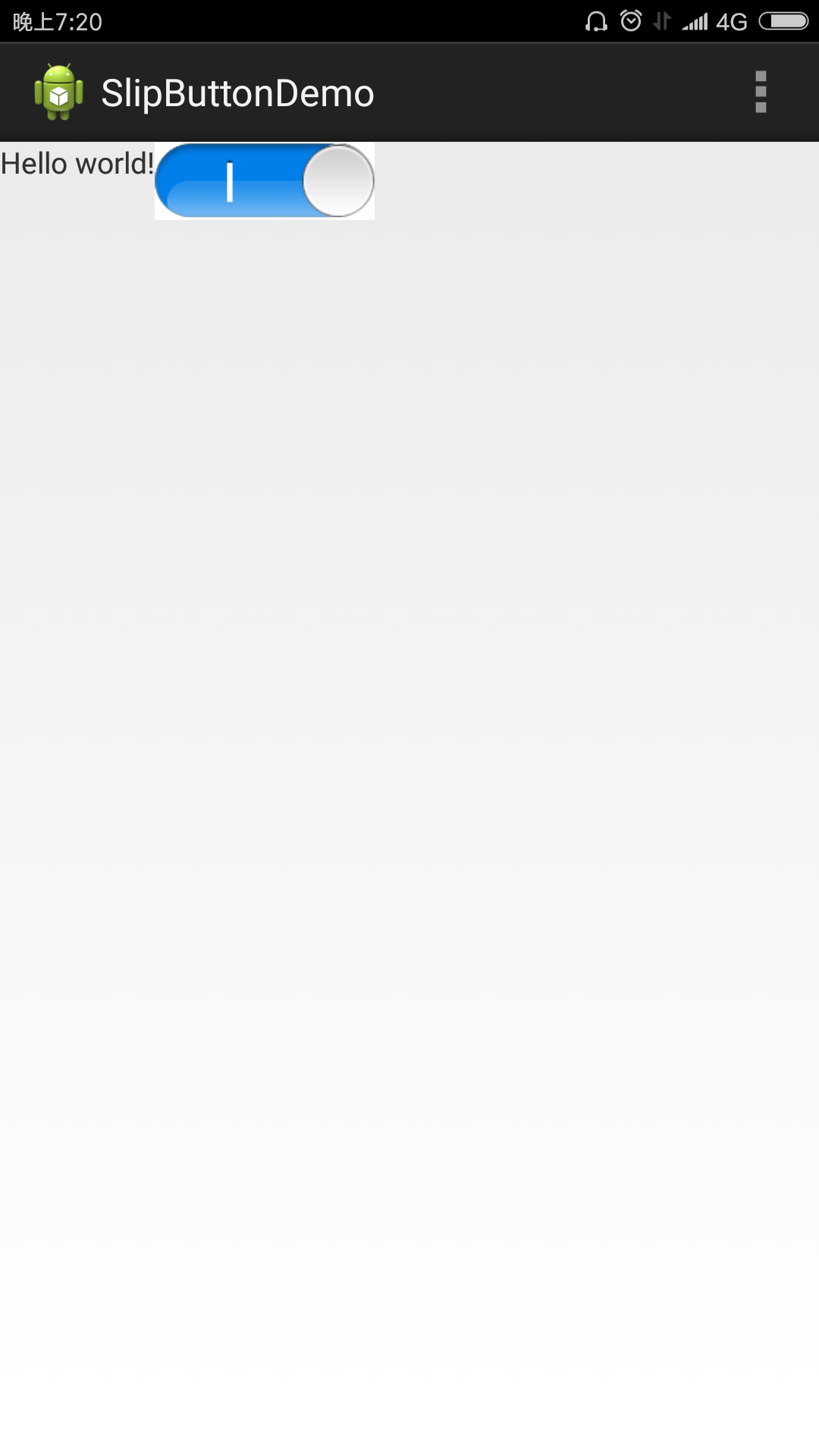
package com.lewis.customerview;

import com.lewis.slipbutton.R;

import android.content.Context;
import android.content.res.TypedArray;
import android.graphics.Bitmap;
import android.graphics.BitmapFactory;
import android.graphics.Canvas;
import android.graphics.Matrix;
import android.graphics.Paint;
import android.graphics.Rect;
import android.util.AttributeSet;
import android.view.MotionEvent;
import android.view.VelocityTracker;
import android.view.View;
import android.view.View.OnTouchListener;

public class SlipButton extends View implements OnTouchListener {

	public static final String TAG = "SlipButton";
	// 开关开启时的背景,关闭时的背景,滑动按钮
	private Bitmap slipImg;
	//the background of the slip button
	private Bitmap bg;
	private Bitmap slipBubble;

	private Matrix matrix = new Matrix();
	private Paint paint = new Paint();
	// 滑动按钮的左边坐标
	private float leftPosOfSlipImg;
	//the middle value of the slip image,note: its not the half of the
	//slip image width,its the place where to show the slip on or off
	//so its smaller than the half of the slip image
	private int slipOnEndPos = 0;
	private int slipOffStartPos = 0;
	private int bgWidth = 0;

	private Rect on_Rect;
	private Rect off_Rect;
	private Rect src_Rect;
	private Rect dst_Rect;
	// 是否正在滑动
	private boolean isSlipping = false;
	// 当前开关状态,true为开启,false为关闭
	private boolean isSwitchOn = false;

	// 手指按下时的水平坐标X,当前的水平坐标X
	private float previousX, currentX;

	// 开关监听器
	private OnSwitchListener onSwitchListener;
	// 是否设置了开关监听器
	private boolean isSwitchListenerOn = false;

	private VelocityTracker mVelocityTracker;
	private static final int SNAP_VELOCITY = 100;

	public SlipButton(Context context) {
		super(context);
		init();
	}

	public SlipButton(Context context, AttributeSet attrs) {
		super(context, attrs);

		TypedArray a = context.obtainStyledAttributes(attrs,
				R.styleable.SlipButton);

		boolean isOn = a.getBoolean(R.styleable.SlipButton_slipOn, false);

		int count = a.getIndexCount();

		//get the specified recourse id in xml file
		int bgId = 0;
		int slipBtId = 0;

		for(int i = 0;i < count; i  ) {

			int attr = a.getIndex(i);
			switch(attr) {

			case R.styleable.SlipButton_bg:
				bgId = a.getResourceId(attr, 0);
				break;
			case R.styleable.SlipButton_slipImg:
				slipBtId = a.getResourceId(attr, 0);
				break;
			}
		}
		a.recycle();
		//decode the image defined in xml file
		setImageRes(bgId, slipBtId);
		setSwitchState(isOn);

		init();
	}

	/**
	 * set touch listener
	 */
	private void init() {

		setOnTouchListener(this);
	}

	public void setImageRes(int bgId, int slipId){

		bg = BitmapFactory.decodeResource(getResources(),bgId);
		slipImg = BitmapFactory.decodeResource(getResources(), slipId);

		slipBubble = BitmapFactory.decodeResource(getResources(),R.drawable.sb_slip_bubble);
		bgWidth = bg.getWidth();
		//The end position of the switch on state
		//25 is the value which half of slip image add to the bubble's right side
		slipOnEndPos = slipImg.getWidth()/2   slipBubble.getWidth()/2;
		//The start position of the switch off state
		slipOffStartPos = slipImg.getWidth()/2 - slipBubble.getWidth()/2;

		on_Rect = new Rect(0, 0,slipOnEndPos, slipImg.getHeight());
		off_Rect = new Rect(slipOffStartPos, 0, slipImg.getWidth(), slipImg.getHeight());
		src_Rect = new Rect(0, 0, bg.getWidth(), slipImg.getHeight());
		dst_Rect = new Rect(0, 0, bg.getWidth(), bg.getHeight());

		//this method should be called to initialize the rect state
		setDrawImgRect();
	}

	public void setSwitchState(boolean switchState) {
		isSwitchOn = switchState;

		if (isSwitchListenerOn) {

			onSwitchListener.onSwitched(isSwitchOn);
		}

		//reset the draw rect
		setDrawImgRect();
		//redraw the view
		invalidate();
	}

	public boolean getSwitchState() {
		return isSwitchOn;
	}

	public void updateSwitchState(boolean switchState) {
		isSwitchOn = switchState;
		invalidate();
	}

	@Override
	protected void onDraw(Canvas canvas) {

		super.onDraw(canvas);

		canvas.drawBitmap(slipImg, src_Rect, dst_Rect, paint);

		canvas.drawBitmap(bg, matrix, paint);
	}

	@Override
	protected void onMeasure(int widthMeasureSpec, int heightMeasureSpec) {

		setMeasuredDimension(bg.getWidth(),
				bg.getHeight());
	}

	@Override
	public boolean onTouch(View v, MotionEvent event) {

		if (mVelocityTracker == null) {
			mVelocityTracker = VelocityTracker.obtain();
		}
		mVelocityTracker.addMovement(event);

		boolean isUpAlreadyCatch = false;
		boolean previousState = false;

		switch (event.getAction()) {

		case MotionEvent.ACTION_MOVE:
			currentX = event.getX();

			previousState = isSwitchOn;
			//check whether need change the state of the switch
			changeSwitchState(event.getX());

			if (isSwitchListenerOn && (previousState != isSwitchOn)) {

				onSwitchListener.onSwitched(isSwitchOn);
			}
			break;

		case MotionEvent.ACTION_DOWN:

			if (event.getX() > bg.getWidth() || event.getY() > bg.getHeight()) {
				return false;
			}

			isSlipping = true;
			previousX = event.getX();
			currentX = previousX;
			break;

		case MotionEvent.ACTION_UP:
			//catch up motion, the default should not change the state of the switch
			isUpAlreadyCatch = true;

			previousState = isSwitchOn;

			changeSwitchState(event.getX());

		default:

			do {

				if (isUpAlreadyCatch) {
					break;
				}
				//when not catch the up motion, check the state of the switch by the move speed of the touch
				final VelocityTracker velocityTracker = mVelocityTracker;
				velocityTracker.computeCurrentVelocity(1000);
				int velocityX = (int) velocityTracker.getXVelocity();

				previousState = isSwitchOn;

				//when the move speed greater than the specified speed, we consider it has a state change
				if (velocityX > SNAP_VELOCITY) {

					isSwitchOn = true;
					break;
				}

				if (velocityX < -SNAP_VELOCITY) {

					isSwitchOn = false;
					break;
				}

			} while (false);

			isSlipping = false;

			//call the listener
			if (isSwitchListenerOn && (previousState != isSwitchOn)) {

				onSwitchListener.onSwitched(isSwitchOn);
			}

			if (mVelocityTracker != null) {
				mVelocityTracker.recycle();
				mVelocityTracker = null;
			}
			break;
		}

		//reset the draw rect
		setDrawImgRect();
		//redraw the view
		invalidate();
		return true;
	}

	private void changeSwitchState(float currentPos) {

		if (currentPos >= (bgWidth / 2)) {
			isSwitchOn = true;
		} else {
			isSwitchOn = false;
		}
	}

	private void setDrawImgRect(){

		do{

			//when slipping, calculator the left position of the slip image to be drawn
			if(isSlipping) {

				if (currentX > bgWidth) {

					leftPosOfSlipImg = on_Rect.left;
				} else {

					leftPosOfSlipImg = slipOffStartPos - currentX;
				}
			}

			if(isSlipping && leftPosOfSlipImg >= 0 && leftPosOfSlipImg <= bgWidth){

				break;
			}

			//need reset the position of the slip image
			if(isSwitchOn) {

				leftPosOfSlipImg = on_Rect.left;
			}else {
				leftPosOfSlipImg = off_Rect.left;
			}

		}while(false);

		int srcLeft = (int) leftPosOfSlipImg;

		src_Rect.left = srcLeft;
		src_Rect.right = srcLeft   bgWidth;
	}

	public void setOnSwitchListener(OnSwitchListener listener) {
		onSwitchListener = listener;
		isSwitchListenerOn = true;
	}

	public interface OnSwitchListener {
		abstract void onSwitched(boolean isSwitchOn);
	}
}
资源文件列表
SlipButtonDemo/.classpath , 475
SlipButtonDemo/.project , 850
SlipButtonDemo/.settings/org.eclipse.core.resources.prefs , 57
SlipButtonDemo/AndroidManifest.xml , 882
SlipButtonDemo/bin/AndroidManifest.xml , 882
SlipButtonDemo/bin/classes/com/lewis/customerview/SlipButton$OnSwitchListener.class , 258
SlipButtonDemo/bin/classes/com/lewis/customerview/SlipButton.class , 6477
SlipButtonDemo/bin/classes/com/lewis/slipbutton/BuildConfig.class , 349
SlipButtonDemo/bin/classes/com/lewis/slipbutton/MainActivity.class , 821
SlipButtonDemo/bin/classes/com/lewis/slipbutton/R$attr.class , 453
SlipButtonDemo/bin/classes/com/lewis/slipbutton/R$dimen.class , 467
SlipButtonDemo/bin/classes/com/lewis/slipbutton/R$drawable.class , 515
SlipButtonDemo/bin/classes/com/lewis/slipbutton/R$id.class , 431
SlipButtonDemo/bin/classes/com/lewis/slipbutton/R$layout.class , 409
SlipButtonDemo/bin/classes/com/lewis/slipbutton/R$menu.class , 394
SlipButtonDemo/bin/classes/com/lewis/slipbutton/R$string.class , 478
SlipButtonDemo/bin/classes/com/lewis/slipbutton/R$style.class , 437
SlipButtonDemo/bin/classes/com/lewis/slipbutton/R$styleable.class , 643
SlipButtonDemo/bin/classes/com/lewis/slipbutton/R.class , 751
SlipButtonDemo/bin/classes.dex , 693584
SlipButtonDemo/bin/dexedLibs/android-support-v4-79810f387a4a36621311464c715c3d84.jar , 232555
SlipButtonDemo/bin/res/crunch/drawable-hdpi/ic_launcher.png , 5964
SlipButtonDemo/bin/res/crunch/drawable-hdpi/sb_bg.png , 722
SlipButtonDemo/bin/res/crunch/drawable-hdpi/sb_slip_bubble.png , 1561
SlipButtonDemo/bin/res/crunch/drawable-hdpi/sb_slip_img.png , 6486
SlipButtonDemo/bin/res/crunch/drawable-mdpi/ic_launcher.png , 3112
SlipButtonDemo/bin/res/crunch/drawable-xhdpi/ic_launcher.png , 9355
SlipButtonDemo/bin/res/crunch/drawable-xxhdpi/ic_launcher.png , 17889
SlipButtonDemo/bin/resources.ap_ , 50595
SlipButtonDemo/bin/SlipButtonDemo.apk , 290012
SlipButtonDemo/gen/com/lewis/slipbutton/BuildConfig.java , 162
SlipButtonDemo/gen/com/lewis/slipbutton/R.java , 6236
SlipButtonDemo/ic_launcher-web.png , 51394
SlipButtonDemo/libs/android-support-v4.jar , 621451
SlipButtonDemo/lint.xml , 53
SlipButtonDemo/proguard-project.txt , 781
SlipButtonDemo/project.properties , 563
SlipButtonDemo/res/drawable-hdpi/ic_launcher.png , 7658
SlipButtonDemo/res/drawable-hdpi/sb_bg.png , 3507
SlipButtonDemo/res/drawable-hdpi/sb_slip_bubble.png , 5467
SlipButtonDemo/res/drawable-hdpi/sb_slip_img.png , 9203
SlipButtonDemo/res/drawable-mdpi/ic_launcher.png , 3777
SlipButtonDemo/res/drawable-xhdpi/ic_launcher.png , 12516
SlipButtonDemo/res/drawable-xxhdpi/ic_launcher.png , 24777
SlipButtonDemo/res/layout/activity_main.xml , 814
SlipButtonDemo/res/menu/main.xml , 263
SlipButtonDemo/res/values/attrs.xml , 945
SlipButtonDemo/res/values/dimens.xml , 220
SlipButtonDemo/res/values/strings.xml , 231
SlipButtonDemo/res/values/styles.xml , 697
SlipButtonDemo/res/values-sw600dp/dimens.xml , 203
SlipButtonDemo/res/values-sw720dp-land/dimens.xml , 277
SlipButtonDemo/res/values-v11/styles.xml , 334
SlipButtonDemo/res/values-v14/styles.xml , 391
SlipButtonDemo/src/com/lewis/customerview/SlipButton.java , 7898
SlipButtonDemo/src/com/lewis/slipbutton/MainActivity.java , 534